Have you ever had your flows showing the following error: There’s a problem that needs to be fixed to trigger this flow. To see more details open flow checker.

Flow Checker Error details
Table of Contents
So the first thing to do is to open the Flow checker.

There is a link that says go to the trigger. When you click on that you will get to the flow run. This is actually quite important. Maybe I should look into this in a bit more detail.
When the flow isn’t triggered the flows also will not appear in this kind of error state. So depending on the trigger of your flows you might discover the problem quicker.
My trigger is failing (for whatever reason), but it will only fail once the trigger is trying to run. So for example flows that check every minute for changes in a datasource will only start to fail after a minute.
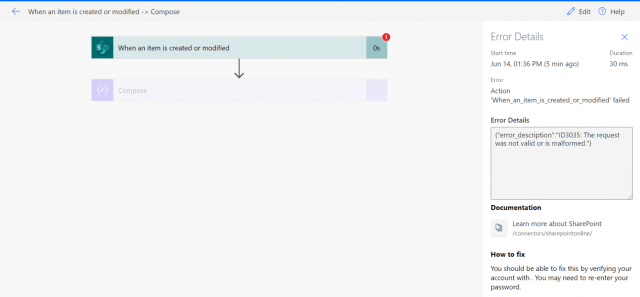
Then when you open the trigger up you can find the reason for the problem. Unauthorized.
The flow is still using the same account as before, so something must have changed to the account that is owning the flow.

Fixing “There’s a problem that needs to be fixed to trigger this flow. “
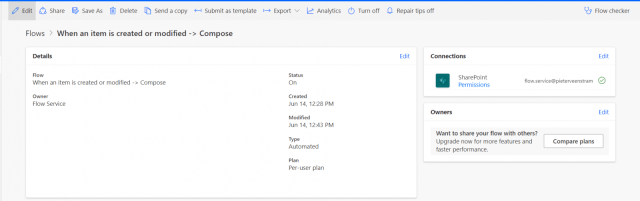
When I look at the connection used by the flow all looks good.

In this case I know what happened and what caused the problem. So my conclusion is that the above connection overview is not up to date.
The password was changed for the account in question and this means that you would expect one of those fix connection links, but they seem to take a bit longer to appear.
So, what to do next?
The first step is to have a look at the connections within Power Automate. once you have found the connection that is used by your trigger in your flow the fix is easy.
Select the switch account in the ellipses menu, as shown below

You will now get a login screen

Just click on the same account again.
And now the connection is fixed and my flow checker has stopped complaining and the There’s a problem that needs to be fixed error has now disappeared.
Discover more from SharePains
Subscribe to get the latest posts sent to your email.