
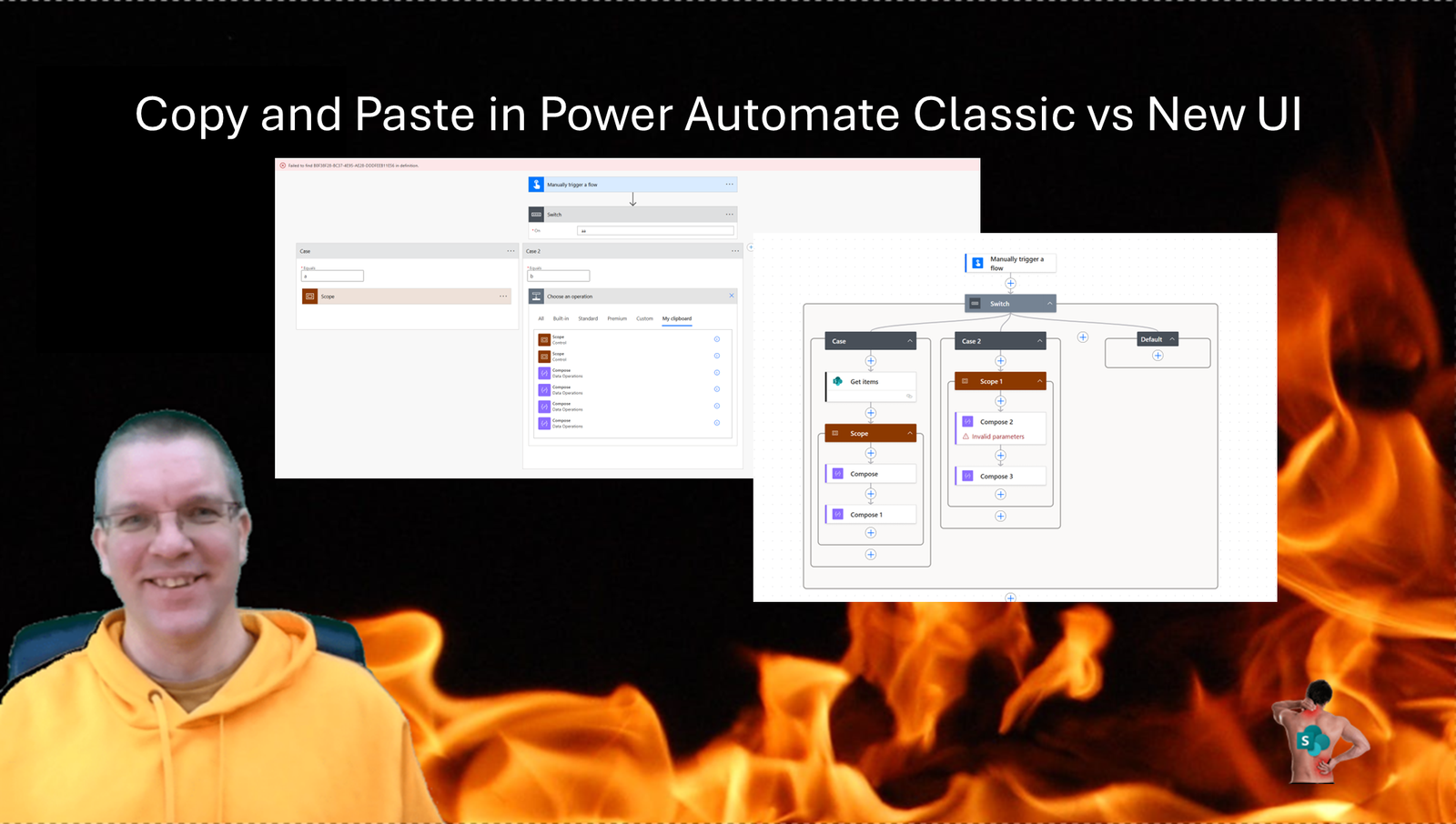
Copy and Paste has existed for a while in the classic Power Automate UI. With the new UI however there are a few additional features in this area worth to be aware of.
Copy and Paste in the Classic UI
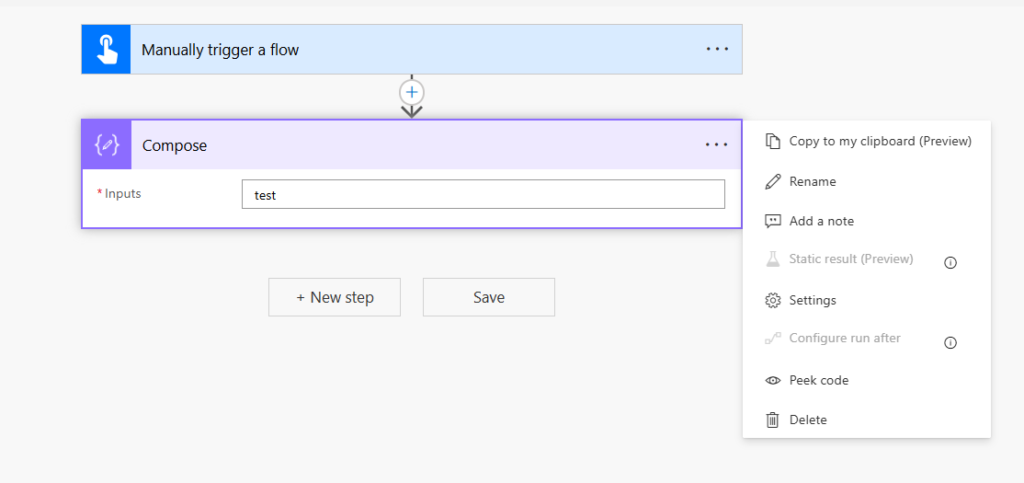
In the classic Power Automate UI we can click on the ellipses (…) and then select Copy to my clipboard(Preview) to copy the action so that we can paste it anywhere in your flow
Notice that Copy and Paste has been in preview since August 2019, therefor you shouldn’t use this in Production flows. ?
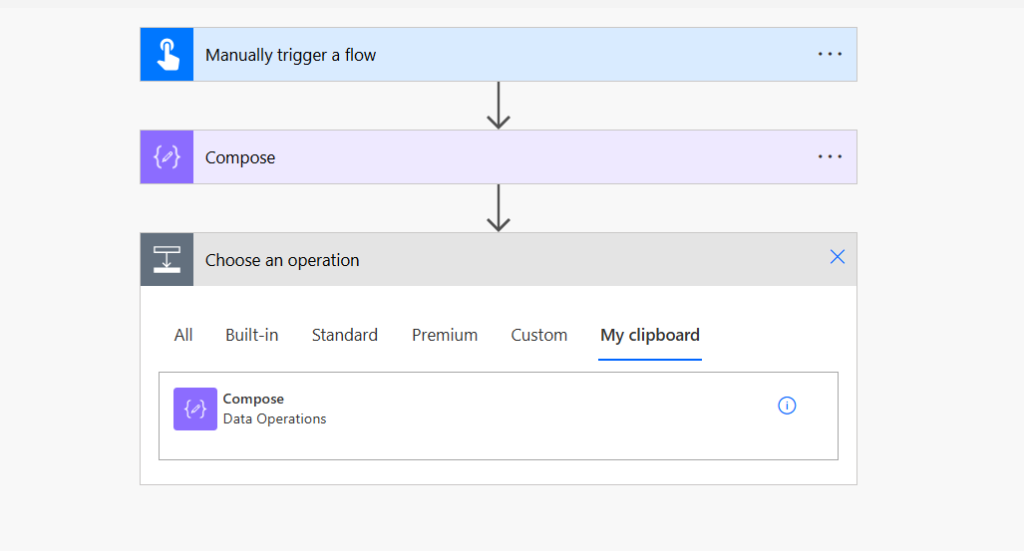
To paste an action, you just have to select the action from your Clipboard.
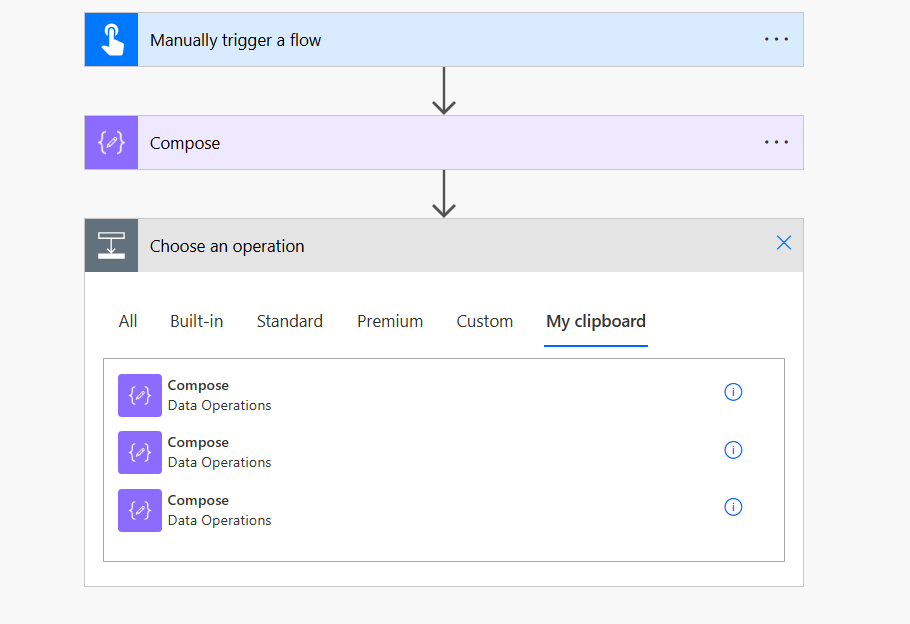
One of the ncie things here is that you can have multiple actions copied to your clipboad.
And you can also copy your actions to notepad or any other editor. So for example when you copy and paste the above Compose actions you would get the following JSON code:
{"id":"d648b611-da80-4860-a5c2-12ff789c8ba0","brandColor":"#8C6CFF","connectionReferences":{},"connectorDisplayName":"Data Operations","icon":"https://content.powerapps.com/resource/makerx/static/pauto/images/designeroperations/dataoperationedit.2c8a4d5e.png","isTrigger":false,"operationName":"Compose","operationDefinition":{"type":"Compose","inputs":"test","runAfter":{}}}And when you want to add a parallel branch you can select the actions in your clipboard.
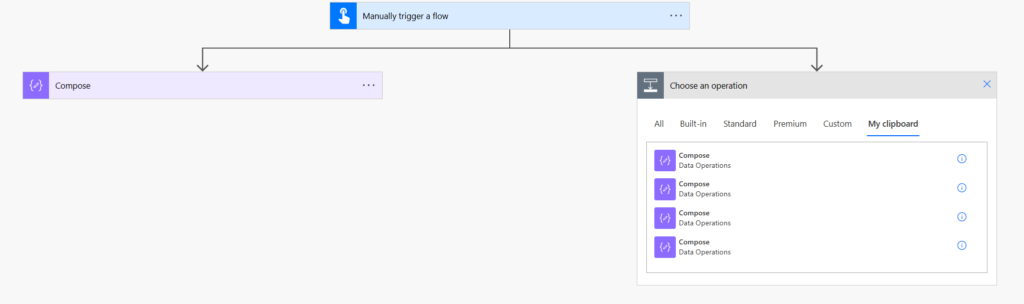
This is especially useful when you have multiple branches that are all very similar.
In a similar way you can also copy multiple actions that either sit within a scope step or in for example an Apply to each loop.
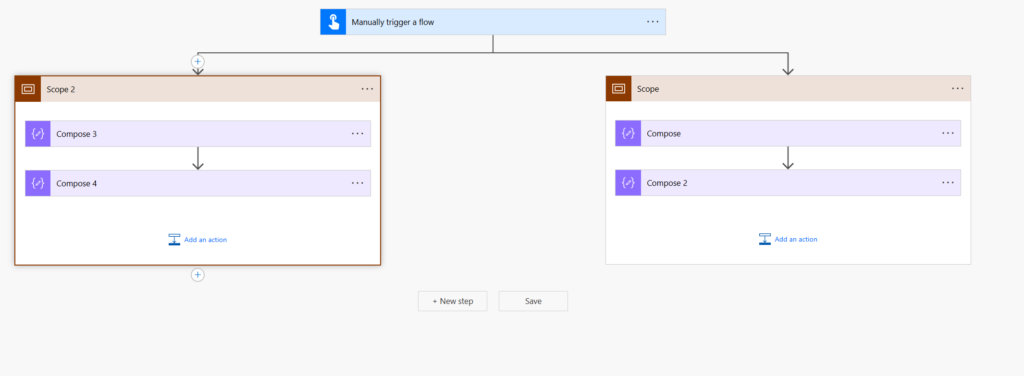
If however you try to Copu and Paste across branches in a switch action then you might get errors like:
Failed to find B0F38F28-BC37-4E95-AE28-DDDFEEB11E56 in definition.
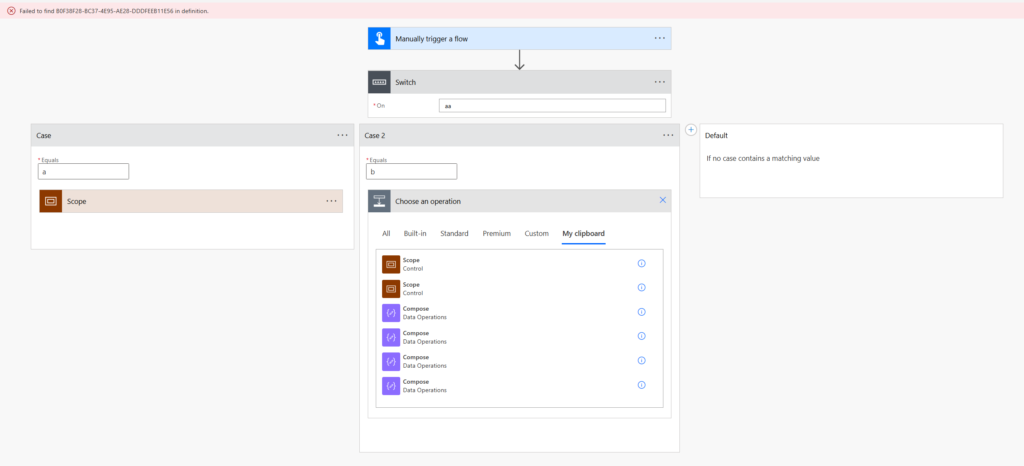
Sometimes you may be able to past the actions first above the switch before you drag and drop them into the right branch.
Copy and Paste in the New UI
In the new Power Automate UI, We can right click on the action that we want to copy and then
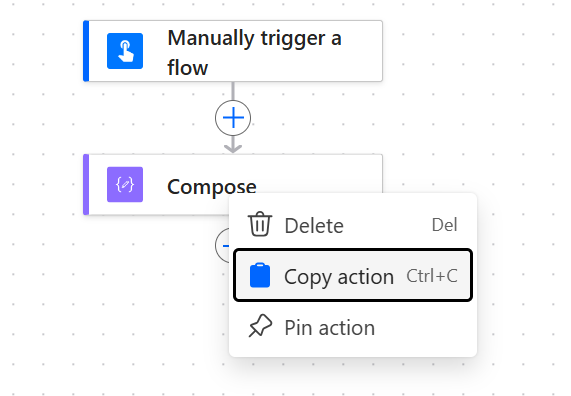
One we have copied the action again we can paste it anywhere in our flow. One big noticeable difference between the classic UI and the new UI is that we can only past the most recently copied action into our flow.
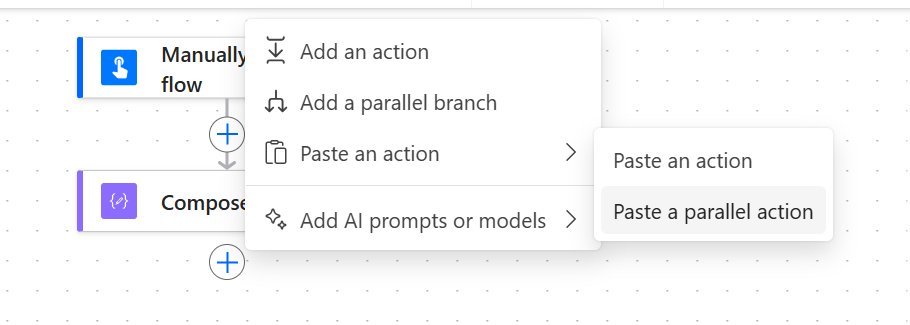
And again we can also copy the action’s code into notepad
{"nodeId":"Compose","nodeData":{"id":"Compose","nodeInputs":{"parameterGroups":{"default":{"id":"default","description":"","parameters":[{"id":"E66DABF8-9538-4CD7-A539-B8F85AD04E10","info":{"isDynamic":false},"hideInUI":false,"label":"Inputs","parameterKey":"inputs.$","parameterName":"Inputs","placeholder":"Inputs","preservedValue":"test","required":true,"schema":{"title":"Inputs","description":"Inputs","properties":{}},"showErrors":false,"showTokens":true,"suppressCasting":true,"type":"any","value":[{"id":"693E607E-E01F-4BAD-95E4-23C68251A952","type":"literal","value":"test","valueType":"string"}],"visibility":""}],"rawInputs":[{"description":"Inputs","key":"inputs.$","name":"Inputs","required":true,"schema":{"title":"Inputs","description":"Inputs","properties":{}},"summary":"","suppressCasting":true,"title":"Inputs","type":"any","visibility":"","hideInUI":false,"value":"test"}]}}},"nodeOutputs":{"outputs":{"outputs.$":{"key":"outputs.$","type":"any","isAdvanced":false,"name":"key-outputs-output","title":"Outputs","schema":{},"source":"outputs","required":true}}},"nodeDependencies":{"inputs":{},"outputs":{}},"operationMetadata":{"iconUri":"https://content.powerapps.com/resource/makerx/static/pauto/images/designeroperations/dataoperationedit.2c8a4d5e.png","brandColor":"#8C6CFF","isConnectToSystemsOperation":false},"settings":{"asynchronous":{"isSupported":false,"value":false},"correlation":{"isSupported":false},"secureInputs":{"isSupported":true},"secureOutputs":{"isSupported":false},"disableAsyncPattern":{"isSupported":false,"value":false},"disableAutomaticDecompression":{"isSupported":false},"splitOn":{"isSupported":false,"value":{"enabled":false}},"retryPolicy":{"isSupported":false},"requestOptions":{"isSupported":false},"sequential":false,"suppressWorkflowHeaders":{"isSupported":false},"suppressWorkflowHeadersOnResponse":{"isSupported":false,"value":false},"concurrency":{"isSupported":false},"singleInstance":false,"timeout":{"isSupported":false},"paging":{"isSupported":false,"value":{"enabled":false}},"uploadChunk":{"isSupported":false,"value":{}},"downloadChunkSize":{"isSupported":false},"trackedProperties":{"isSupported":true},"requestSchemaValidation":{"isSupported":false,"value":false},"conditionExpressions":{"isSupported":false},"runAfter":{"isSupported":false,"value":[]},"invokerConnection":{"isSupported":false,"value":{"enabled":false}},"statelessFlow":{"isSupported":false,"value":{"enabled":false}}},"actionMetadata":{"operationMetadataId":"92f3e29b-0512-41c5-a5f4-9e1f3cd84dea"},"repetitionInfo":{"repetitionReferences":[]}},"nodeTokenData":{"tokens":[{"key":"outputs.$","brandColor":"#8C6CFF","icon":"https://content.powerapps.com/resource/makerx/static/pauto/images/designeroperations/dataoperationedit.2c8a4d5e.png","title":"Outputs","name":"key-outputs-output","type":"any","isAdvanced":false,"outputInfo":{"type":"outputs","required":true,"source":"outputs","isSecure":false,"actionName":"Compose","schema":{}}}],"upstreamNodeIds":["Manually_trigger_a_flow"]},"nodeOperationInfo":{"connectorId":"DataOperation","operationId":"Compose","type":"Compose"},"nodeConnectionData":null,"isScopeNode":false,"mslaNode":true}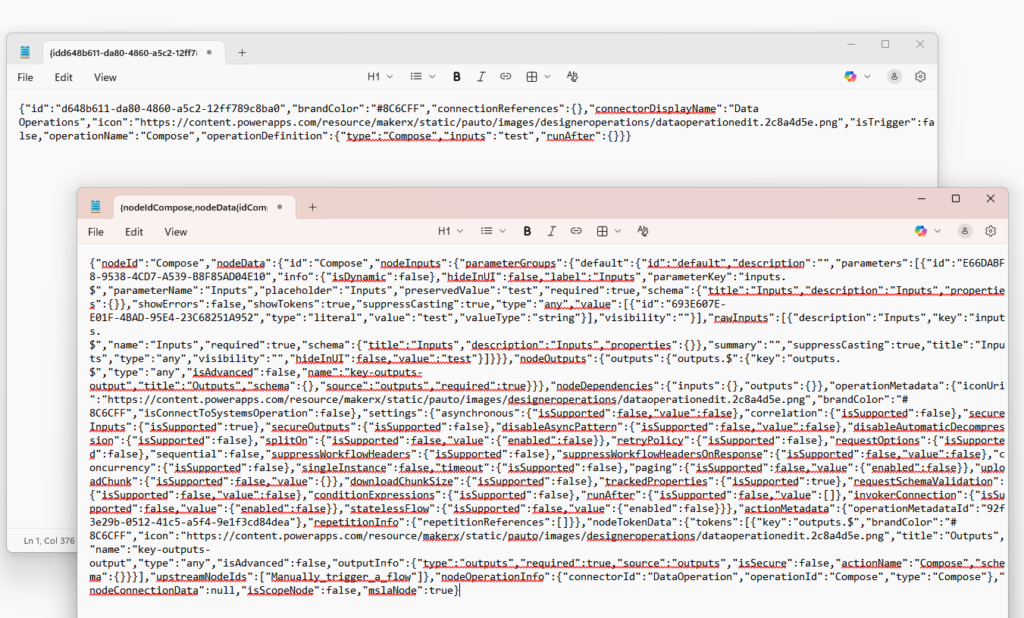
Ok, I’m going to structure this a bit better. The old UI gives us quite a simple overview of the Compose action.
{
  "id":"d648b611-da80-4860-a5c2-12ff789c8ba0",
  "brandColor":"#8C6CFF",
  "connectionReferences":{},
  "connectorDisplayName":"Data Operations",
  "icon":"https://content.powerapps.com/resource/makerx/static/pauto/images/designeroperations/dataoperationedit.2c8a4d5e.png",
  "isTrigger":false,
  "operationName":"Compose",
  "operationDefinition":{
                          "type":"Compose",
                          "inputs":"test",
                          "runAfter":{}
                         }
}
Within the new UI the copy gives a lot more code. I picked on purpose only the Compose to keep it small, but if anybody is wondering why the new UI is any slower than the classic UI then this might give us a clue.
{
    "nodeId": "Compose",
    "nodeData": {
        "id": "Compose",
        "nodeInputs": {
            "parameterGroups": {
                "default": {
                    "id": "default",
                    "description": "",
                    "parameters": [
                        {
                            "id": "E66DABF8-9538-4CD7-A539-B8F85AD04E10",
                            "info": {
                                "isDynamic": false
                            },
                            "hideInUI": false,
                            "label": "Inputs",
                            "parameterKey": "inputs.$",
                            "parameterName": "Inputs",
                            "placeholder": "Inputs",
                            "preservedValue": "test",
                            "required": true,
                            "schema": {
                                "title": "Inputs",
                                "description": "Inputs",
                                "properties": {}
                            },
                            "showErrors": false,
                            "showTokens": true,
                            "suppressCasting": true,
                            "type": "any",
                            "value": [
                                {
                                    "id": "693E607E-E01F-4BAD-95E4-23C68251A952",
                                    "type": "literal",
                                    "value": "test",
                                    "valueType": "string"
                                }
                            ],
                            "visibility": ""
                        }
                    ],
                    "rawInputs": [
                        {
                            "description": "Inputs",
                            "key": "inputs.$",
                            "name": "Inputs",
                            "required": true,
                            "schema": {
                                "title": "Inputs",
                                "description": "Inputs",
                                "properties": {}
                            },
                            "summary": "",
                            "suppressCasting": true,
                            "title": "Inputs",
                            "type": "any",
                            "visibility": "",
                            "hideInUI": false,
                            "value": "test"
                        }
                    ]
                }
            }
        },
        "nodeOutputs": {
            "outputs": {
                "outputs.$": {
                    "key": "outputs.$",
                    "type": "any",
                    "isAdvanced": false,
                    "name": "key-outputs-output",
                    "title": "Outputs",
                    "schema": {},
                    "source": "outputs",
                    "required": true
                }
            }
        },
        "nodeDependencies": {
            "inputs": {},
            "outputs": {}
        },
        "operationMetadata": {
            "iconUri": "https://content.powerapps.com/resource/makerx/static/pauto/images/designeroperations/dataoperationedit.2c8a4d5e.png",
            "brandColor": "#8C6CFF",
            "isConnectToSystemsOperation": false
        },
        "settings": {
            "asynchronous": {
                "isSupported": false,
                "value": false
            },
            "correlation": {
                "isSupported": false
            },
            "secureInputs": {
                "isSupported": true
            },
            "secureOutputs": {
                "isSupported": false
            },
            "disableAsyncPattern": {
                "isSupported": false,
                "value": false
            },
            "disableAutomaticDecompression": {
                "isSupported": false
            },
            "splitOn": {
                "isSupported": false,
                "value": {
                    "enabled": false
                }
            },
            "retryPolicy": {
                "isSupported": false
            },
            "requestOptions": {
                "isSupported": false
            },
            "sequential": false,
            "suppressWorkflowHeaders": {
                "isSupported": false
            },
            "suppressWorkflowHeadersOnResponse": {
                "isSupported": false,
                "value": false
            },
            "concurrency": {
                "isSupported": false
            },
            "singleInstance": false,
            "timeout": {
                "isSupported": false
            },
            "paging": {
                "isSupported": false,
                "value": {
                    "enabled": false
                }
            },
            "uploadChunk": {
                "isSupported": false,
                "value": {}
            },
            "downloadChunkSize": {
                "isSupported": false
            },
            "trackedProperties": {
                "isSupported": true
            },
            "requestSchemaValidation": {
                "isSupported": false,
                "value": false
            },
            "conditionExpressions": {
                "isSupported": false
            },
            "runAfter": {
                "isSupported": false,
                "value": []
            },
            "invokerConnection": {
                "isSupported": false,
                "value": {
                    "enabled": false
                }
            },
            "statelessFlow": {
                "isSupported": false,
                "value": {
                    "enabled": false
                }
            }
        },
        "actionMetadata": {
            "operationMetadataId": "92f3e29b-0512-41c5-a5f4-9e1f3cd84dea"
        },
        "repetitionInfo": {
            "repetitionReferences": []
        }
    },
    "nodeTokenData": {
        "tokens": [
            {
                "key": "outputs.$",
                "brandColor": "#8C6CFF",
                "icon": "https://content.powerapps.com/resource/makerx/static/pauto/images/designeroperations/dataoperationedit.2c8a4d5e.png",
                "title": "Outputs",
                "name": "key-outputs-output",
                "type": "any",
                "isAdvanced": false,
                "outputInfo": {
                    "type": "outputs",
                    "required": true,
                    "source": "outputs",
                    "isSecure": false,
                    "actionName": "Compose",
                    "schema": {}
                }
            }
        ],
        "upstreamNodeIds": [
            "Manually_trigger_a_flow"
        ]
    },
    "nodeOperationInfo": {
        "connectorId": "DataOperation",
        "operationId": "Compose",
        "type": "Compose"
    },
    "nodeConnectionData": null,
    "isScopeNode": false,
    "mslaNode": true
}
Within the new UI we can also copy multiple actions in one go. These actions can be either withing a scope box, or for example an Apply to each loop.
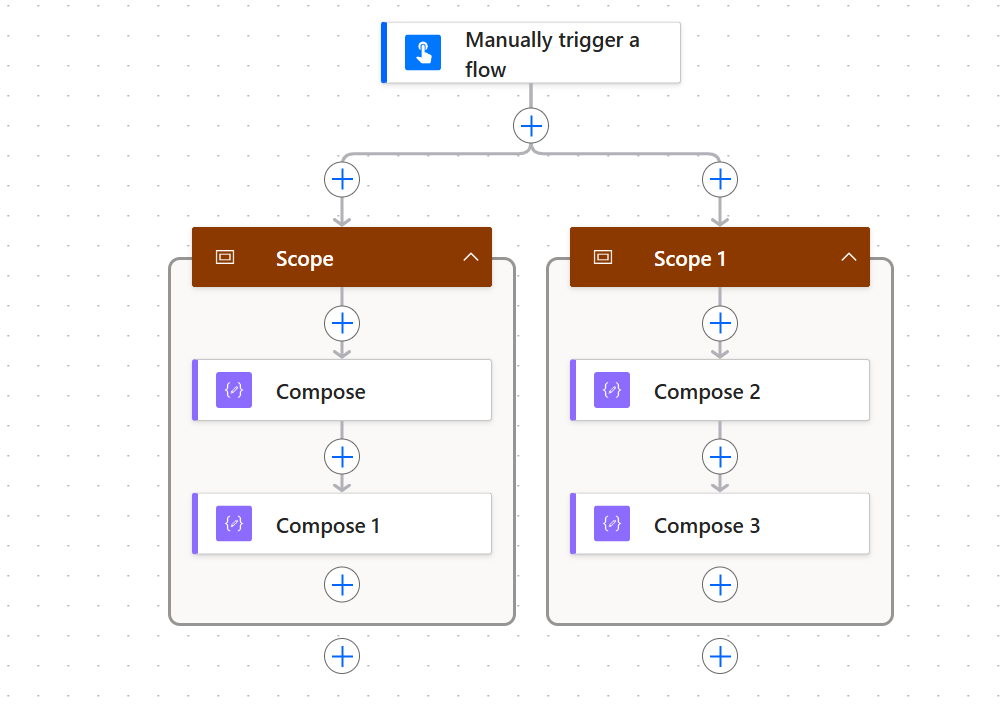
So far we’ve not seen a real benefit of the new UI yet. But that is on the way. Shown below a copy and past action from one branch into the next
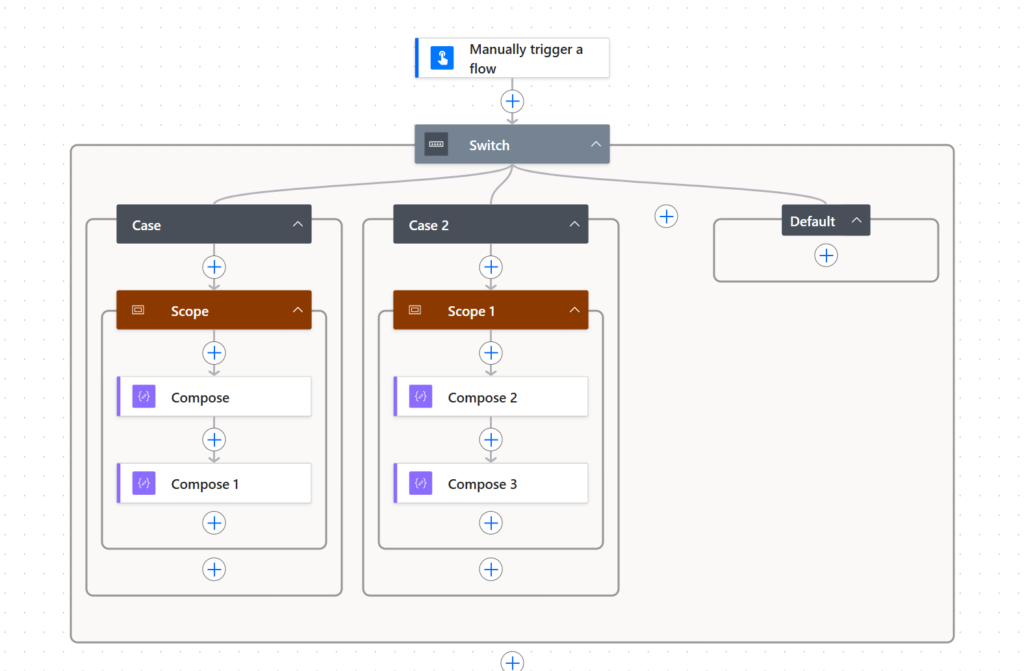
And even if we copy some actions with dependencies , the actions will succeed to copy between branches. We are even being told where to find the dependencies. in the below example Compose 2 has an error as it references the Get Items action within the other branch.
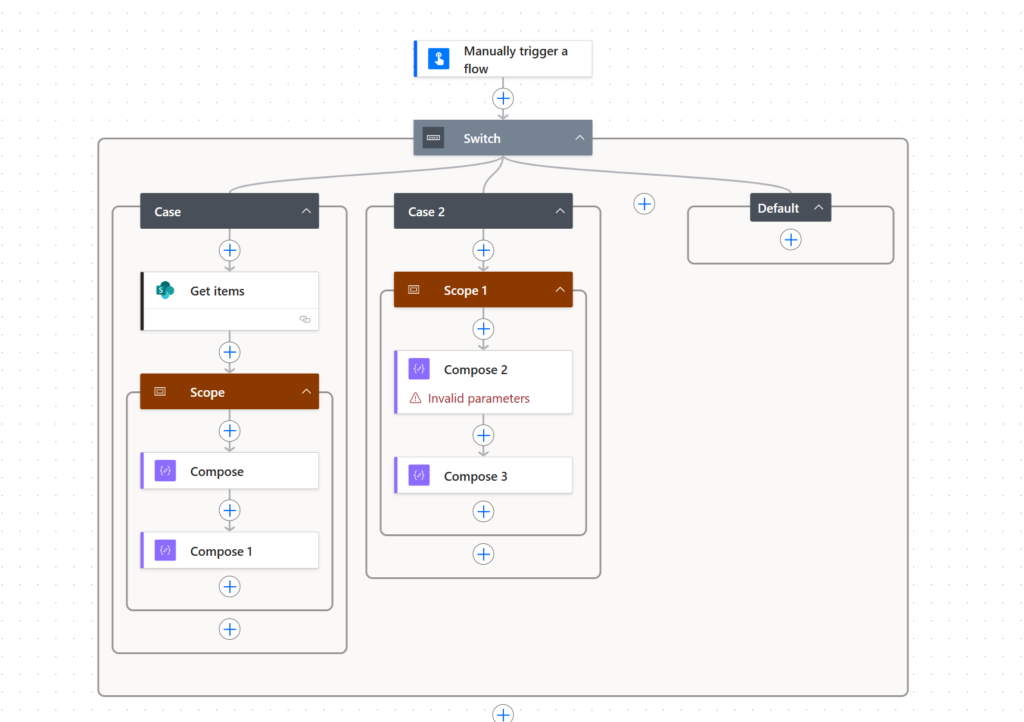
This is so much better than the classic UI, where we just cannot copy actions across the various branches in a switch.
Pieter Veenstra

Is your business still running on paper trails, sprawling Excel files, or ageing Access databases? There's a better way — and I can show you exactly what it looks like. I'm the Technical Director of Vantage 365, a Microsoft solutions consultancy working with clients across the UK, the Netherlands, and worldwide. For over 30 years I've been turning messy, manual business processes into clean, automated systems that save time, reduce errors, and give teams the visibility they need to make better decisions. SharePains is not just any blog run by a Microsoft MVP. Have you ever used Try-Catch in Power Automate? The original post about Try-Catch in Power Automate can still be found on this site, https://sharepains.com/2018/02/07/try-catch-finally-in-power-automate-flow/ Or have you ever used the Pieter’s method to avoid variables and speed up your flows? https://sharepains.com/2020/03/11/pieters-method-for-advanced-in-flows/ You can contact me using contact@sharepains.com

