
In this post I’m looking at some unexpected performance issues with the Filter array action in Power Automate.
The Filter Array Action
The Filter Array action takes an array of data from any previous action and with simple queries we can get a subset of the original array.
This could for example look like this:
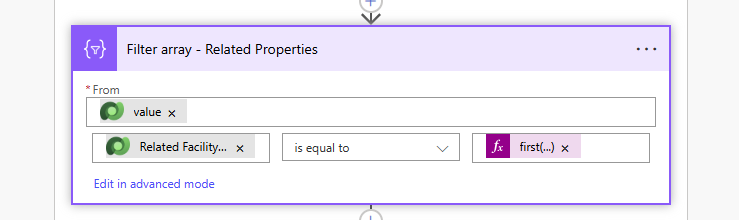
We take the output from a Dataverse action. and then we compare a property within this array with a specified value. This is nice and easy.
Connecting into datasources
Now imagine having multiple List row actions inside an apply to each. Each of these list rows will return a small number of records or only 1 record, that is later on used within the apply to each.
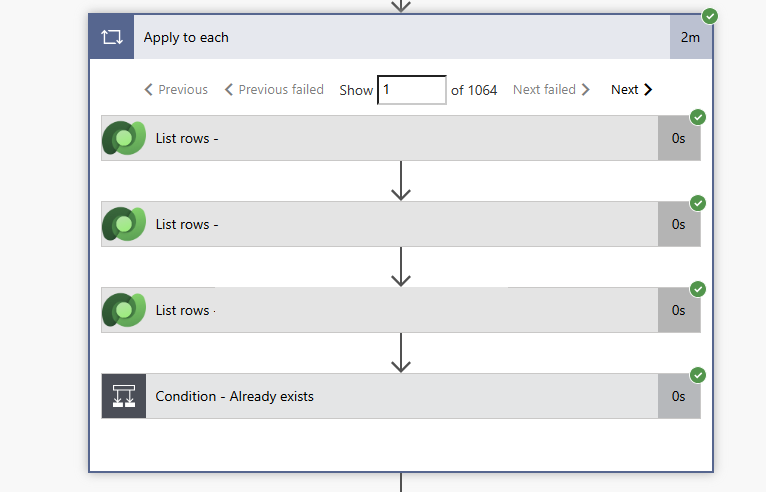
In this case I have 1064 iterations within my apply to each and each time I’m collecting 3 records using my three list rows actions from various tables in Dataverse.
Performance Optimisation ideas
Rather than repeating the list row action inside your
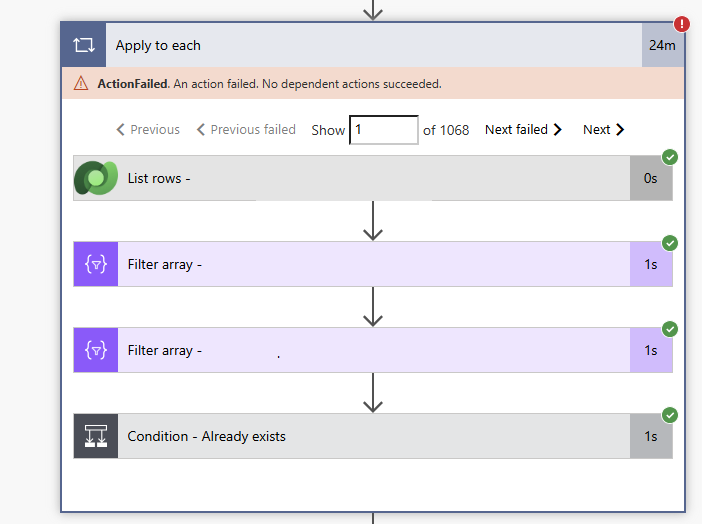
apply to each you should consider collecting all the records before the apply to each. Afterwards we can use three filter array actions inside the apply to each. As Power Automate should then use data from memory rather than collecting records form Dataverse within each iteration of my Apply to each.
Well, here are my findings. Ignore the one record that failed. We can see that each filter array is taking 1 second, while the List rows in Dataverse is taking almost no time at all.
Now why is that?
The answer is quite simple. We need to have a look at how much data is moving around.
Calculations for dataverse only
In our first example
The Dataverse Actions would spit out 3 records in each iteration. So in total we have 3 * 1068 records returned to Power Automate from the datasource.
Calculations for Dataverse and Filter Array
In our second example we get 1068 records from Dataverse however each iteration of my apply to each will take a long array of records, sends this to the Filter array action. So if we assume that we have 1000 records in each of the tables. Then we have 1000 * 1068 * 2 records being processed. This is a lot worse then the amount of data being pushed between the various actions in our first example.
Some thoughts
It can really help sometimes to reduce the number of API calls that we make, however we also need to consider how much data is being moved around within a flow. Sometimes it is better to make more API calls if that mean that we reduce the amount of data being processed.
Reducing the number of API calls can of course help if you are seeing limitations of connectors. For example when you get 429 errors returned by actions. But replacing API calls with alternatives may not help.
Next week, part 2 in which I will explain how to make this optimisation idea work.
Pieter Veenstra

Is your business still running on paper trails, sprawling Excel files, or ageing Access databases? There's a better way — and I can show you exactly what it looks like. I'm the Technical Director of Vantage 365, a Microsoft solutions consultancy working with clients across the UK, the Netherlands, and worldwide. For over 30 years I've been turning messy, manual business processes into clean, automated systems that save time, reduce errors, and give teams the visibility they need to make better decisions. SharePains is not just any blog run by a Microsoft MVP. Have you ever used Try-Catch in Power Automate? The original post about Try-Catch in Power Automate can still be found on this site, https://sharepains.com/2018/02/07/try-catch-finally-in-power-automate-flow/ Or have you ever used the Pieter’s method to avoid variables and speed up your flows? https://sharepains.com/2020/03/11/pieters-method-for-advanced-in-flows/ You can contact me using contact@sharepains.com

