In the recent 7 months the new SharePoint Framework has been taking off. Many developers have started to look into the options and this has resulted in many contributions on GitHub.
In this post I’m giving a quick overview of the available samples. I’m categorizing the web parts in the following categories:
- Angular
- JQuery
- JavaScript
- KnockOut
- React
- None/Other
As the current SPFx only comes with 3 templates (KnockOut, React and None). It’s nice to see that a popular framework like Angular has already plenty of examples. Maybe it’s time to add a Angular as a new options to the list of available templates. At least that would create a standard before too many examples all follow their own standard.
This ever growing list of samples shows that you could go for two approaches:
- Pick a framework and stick to it ( see multiple implementations of the list viewers below)
- Pick the best framework for the job and mix the frameworks within your total solution
Then now the full overview of examples that is currently available on GitHub without having to go through each separate sample. Some of these samples can be used on your sites and some of the samples are more technically solving smaller technical issues.
Angular
Table of Contents
Call custom Web API secured with AAD from SharePoint Framework client-side web part using Angular v1.x
This SharePoint Framework client-side web part illustrates the communication with a custom Web API secured with Azure Active Directory

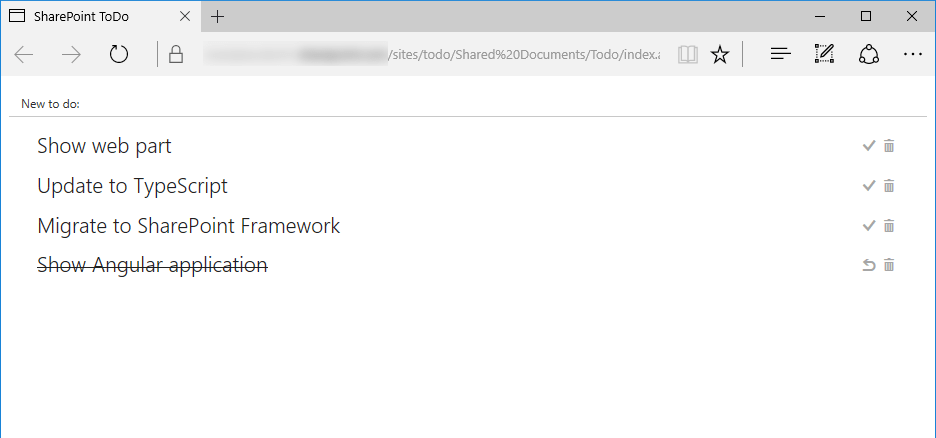
Migrating existing Angular applications to SharePoint Framework
This sample shows how to migrate an existing Angular app to the new SharePoint Framework client-side web part. By migrating the app to SPFx, the app can now be available within the SharePoint chrome without changing the app.

Most Popular Items WebPart using Angular & ngOfficeUIFabric
This Web Part displays the Most Popular Items from the given Site and Document Library using the SharePoint search API.
NOTE: This web part is not available anymore on github

Multi-screen web part
This SharePoint Framework client side web part shows the creation of a multiple screens (like in PowerApps) within a web part. One screen will show a questionnaire where a second screen shows the results of the questionnaire.

File Upload
Update and delete files in SharePoint from you client side web part.

You can configure the document library that is used in the web part properties.
Search
This is a sample Search web part that illustrates how you can use search within the new SharePoint Framework

To-Do List
This sample shows the creation of a to do list.
Yammer
This web part displays the feeds from yammer. Additionally this is quite a nice example of using custom web part properties.
NOTE: This web part is not available anymore on github
JQuery
Using JQuery from CDN
This sample web part illustrates using jQuery and its plugins loaded from a CDN for building SharePoint Framework Client-Side Web Parts.
JQuery, Photopile.JS & Office UI Fabric Client-Side Web Part
This is another great sample web part! It shows how to use JQuery and Photopile.Js within the SharePoint Framework.
You can display the photos contained in a SharePoint Pictures Library and it simulates a pile of photos scattered about on a surface. Thumbnail clicks remove photos from the pile, (enlarging them as if being picked up by the user), and once in view a secondary click returns the photo to the pile.
JavaScript
Basic Site Provisioning and Microsoft Bot Framework
This is a sample SharePoint Framework client-side web part showing site provisioning using the Microsoft Bot Framework.
NOTE: This web part is not available anymore on github
Display Employee Spotlight JavaScript Client-Side Web Part
This Web Part that demonstrates the use of SharePoint Framework for show casing Employee Spotlight. The web part pulls data from a configured list and User Profile service. The properties pane for this web part has 5 cascading dropdowns.
Display List JavaScript Client-Side Web Part
This web part demonstrates the use of JavaScript in a SharePoint Framework web part. The properties pane for this web part display a drop down list of lists in the current site. Once the user selects one of the lists, the web part display the contents of the list.
Modern Calendar
This is a client side web part demonstrating how to build a calendar web part.

Power BI
This sample SharePoint Framework Client-Side Web Part embedding a PowerBI report.
KnockOut
SharePoint PnP JS
This web part demonstrates how to integrate the sp-pnp-js library into the SharePoint Framework as well as including mock data and simple list I/O.
Web part Properties
This sample Web Part illustrating
- requesting Lists and Views data from SharePoint REST API
- creating Knockout dropdown custom component with Fabric UI styling
- creating dependent properties (dropdowns) in Client-Side Web Part Property Pane
Taxonomy
This sample Web Part goes through reading taxonomy term store hierarchy
React
React sample showing the use of sp-pnp-js with Async / Await
This web part demonstrates how to use PnP JS Core with Async functions into the SharePoint Framework as well as integrating PnP JS and SPFx Logging systems. Real example querying SharePoint library to show document sizes.
Azure Active Directory implicit flow authentication samples
This sample SharePoint Framework client-side web part shows upcoming meetings for the current user retrieved using the Microsoft Graph. This web part uses React using implicit OAuth flow with Azure Active Directory.
Call custom Web API secured with AAD
This sample SharePoint Framework client-side web part illustrates communication with a custom Web API secured with Azure Active Directory.
React sample showing the use of sp-pnp-js with Async / Await
This web part demonstrates how to use PnP JS Core with Async functions into the SharePoint Framework as well as integrating PnP JS and SPFx Logging systems. Real example querying SharePoint library to show document sizes.
Microsoft Bot Framework Web Chat
A web part that acts as a web chat component for bot’s built on the Microsoft Bot Framework using the Direct Line API. When sending messages the web part uses the username of the currently logged in user. The colours used by the web part can be configured for branding purposes.
You can see this web part in action in the PnP SPFx Special Interest Group recording where sample was demonstrated.
Custom property pane controls
Sample custom property pane controls built in React for use with SharePoint Framework client-side web parts.
In this sample the drop-down loads its options asynchronously it also shows cascading drop-downs in the property pane. Both of these drop-downs use external data.
Charts
This webpart uses the Chart.js library to visualize SharePoint list data.
Chart types that available are:
- Bar
- Horizontal Bar
- Doughnut
- Line
- Pie
- Polar
- Radar
Each chart is uniquely themed with the built-in color theme generator (color-scheme), continue generating a theme until you find one to your liking.
New charts are populated with Sample data, select a site (or define a custom path with the Other option), a list data source, label column, data column and which column indicates a unique value in your list. See the demo below for an example.
Current Data Functions available are:
- Average
- Count
- Sum

SharePoint Framework webpart sample using React, Redux and ImmutableJS
This SharePoint Framework web part which uses Redux to maintain a single state for the entire application and ImmutableJS to create performant state trees.
Redux AJAX actions are used together with the SharePoint REST API to display lists in your site. You can also add a new list to the site from this web part.

Grid/Quick Edit Web Part
React-multilist-grid is an SPFx web part that uses React, Office-UI-Fabric, and Redux to let users edit list data from lists that reside in multiple webs and multiple sites in a single grid, similar to Quick Edit mode. The lists do not have to be of the same type – you just need to create column mappings to tell the web part which fields to show in which columns of the grid.
Multi Screen Web Part
This same as the earlier Angular web part, but this time it’s implemented using React
Office Graph Web Part
This sample SharePoint Framework Client-Side Web Part built using React showing interaction with the Office Graph.
This is a collection of samples:
- documents trending in the current site.
- showing people with whom the current user has recently been working with.
- showing documents recently viewed or modified by the current user.
- showing documents trending in the sites followed by the current user.
Organisation Chart
A simple Organisation Chart web part using Office UI Fabric, React, REST API batching and ServiceScope.
People Picker
In this SharePoint Framework solution, a people picker is made available using the Office UI Fabric People Picker and the SharePoint Search API to retrieve people.

Property Bag Navigation Web part
This sample shows how we can provision Document Library, Custom List, Web and List PropertyBag properties, Site Columns, Content Types, Images, Site Page with the SFPx Client side webpart and even pre populated list and library items along with the SPFx solution package. All of the components can be deployed at once with the SPFx webpart when the app is added to a SharePoint site. It also contains custom list and document library xml schemas.
News Feed
This sample shows you how to implement real time news feed web part using the SPFx, Azure Logic Apps, Node.js and socket.io.
Script Editor
Similar to the classic SharePoint pages, this web part help implementing existing script solutions on a modern page without having to repackage it as a new SharePoint Framework web part. This web part is similar to the classic Script Editor Web Part, and allows you do drop arbitrary script or html on a modern page.
Search
Sample Search Web Part with internal and external template support. This sample illustrates how you can use React and Flux within the SharePoint Framework.
Side Panel Client-Side Web Part
The web part illustrates creation and usage of Side Panel (Sidebar) control.
Communicate using elevated privileges with SharePoint
This sample SharePoint Framework client-side web part illustrates communication with SharePoint using elevated privileges through a custom Web API.
Taxonomy Picker
A Taxonomy Picker control built with React based on react-taxonomypicker for use within SharePoint Framework client-side web parts
SharePoint Themes
This web part illustrates how to use SharePoint Theme variables in custom web parts.
To-Do list
A simple to do web part built using react to showcase some of the SharePoint Framework developer features, utilities and best practices in building react based web parts.
NOTE: This web part is not available anymore on github
Video 3d Carousel
A set of 3 SPFX webparts that use different open-source carousels (react-3d-carousel, reactjs-coverface, and react-slick) to display videos stored on an Office 365 Video Channel. The idea being to display a carousel of the thumbnail images, and then when a user clicks on one of the thumbnails, replace the tumbnail with a video player, or an Iframe playing the video.
Yammer
This sample shows how to use the Yammer REST APIs from SharePoint Framework React web part and the Yammer JavaScript SDK. The SPFx webpart contains a wrapper around the Yammer JavaScript SDK that can be extended for a fluent TypeScript API experience.
None/Other
Azure Active Directory invitation manager Graph API samples
Sample SharePoint Framework web parts built using React illustrating the possibility to use Graph API to invite external users into the Azure Active Directory.

Recent orders
This sample web part showing the list of latest orders retrieved from a custom API secured with AAD without using ADALJS
RiotJS List Viewer
This is a Simplistic sample Web Part that demonstrates the use of RiotJS in creating a SharePoint Framework web part. The properties pane for this web part display a drop down list of lists in the current web. Once the user selects one of the lists, the web part display the contents of the list.
SharePoint Crud
this sample Web Part illustrates how to perform SharePoint CRUD operations in React, Angular and JavaScript without any framework, using the SP PnP JS library.
Discover more from SharePains
Subscribe to get the latest posts sent to your email.
This is awesome! Thanks so much for providing.