The Switch is one of the steps in Power Automate that can cause a lot of failures. And it might not always be clear why things are going wrong.
The Switch
Table of Contents
In this post I’m going to have a look at the Switch step and how we can use the coalesce function in switch steps. Coalesce is one of those functions that is really useful, but it is often forgotten about.
Before I have a look at coalesce, I will first have a look at the switch in more detail.
For this example, I created a list with a choice field. Now the typical usage of a choice field is that you give users a choice out of many choices that they can select. In this case however, the field is not mandatory and therefore it could be left blank.
The flow that I created in Power Automate triggers on the creation of a new item and a switch that responds to my choice field. Different branches of my flow will run depending on the choice selected by the user.

Then I created a new list item and selected Choice 1 as my value for my choice field. This now mean that my switch step will run the branch relevant to the Choice 1 that was selected when the item was created in SharePoint.

All good so far, but now what happens if you don’t select anything and the choice field remains empty. You might expect (or hope) that the default branch is followed. It would make sense for the default branch to run as none of the other branches match.

But that is not the case. Your flow will fail with an ugly error message:
The execution of template action ‘Switch’ failed: The result of the evaluation of ‘scope’ action expression ‘@triggerBody()?[‘Choice’]?[‘Value’]’ is not valid. It is of type ‘Null’ but is expected to be a value of type ‘String, Integer’.
The problem here is not that the value isn’t listed in any of my branches but the switch step will only accept either numbers or text as the values used to decide which branch needs to run.
An empty value doesn’t match the type of the other branches, hence the Switch is reporting the error above.
One way to get around this is to check before the switch if the choice field has been set or not and then run the switch only when it is set. If this is your approach then, have you noticed that your flows become large? Many of these condition steps just make flows difficult to understand.
There is a better way around this.
The Coalesce function
Within the switch step don’t use the Choice Value, but use the Choice value inside a coalesce function. So that means that your expression in the switch should look something like this:
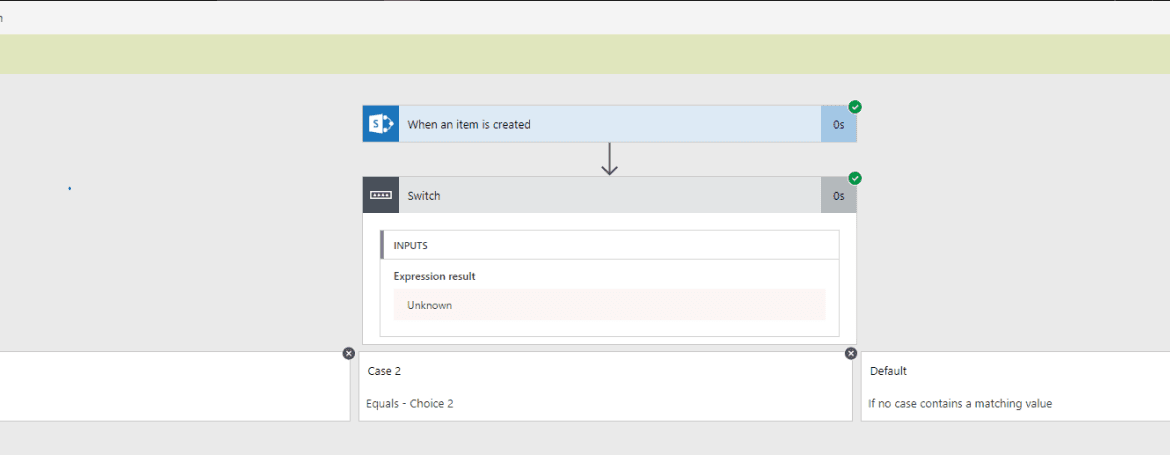
coalesce(triggerBody()?['Choice']?['Value'],'Unknown')The Coalesce function will return either the value of the Choice or if that is not set, ‘Unknown’ will be returned. If you happen to have a switch that uses numbers, like 1, 2, 3 then you could decide to return -1 as a default instead of unknown. As long as the type of the default value matches the other possible values your flow should be ok.

And now your flow runs without failure (Well at least your switch doesn’t fall over!)
Other Switch Posts
When you would like to know more about switch steps, have a read through my post about Large switches with more than 25 options
FAQs
What is the coalesce function used for in Power Automate?
Coalesce is typically used to handle null values where null values aren’t expected. Using the coalesce function in Switch steps is often a good idea.
Discover more from SharePains
Subscribe to get the latest posts sent to your email.
Nice, Coalesce and Unknown for Switch/Case.
I’m working for HR and I just wanted to say BIG/HUGE THANKS! this has helped me enormously to keep my flow working without that ‘Null’ error message. 🙂
Can you do this with a boolean response? I tried this, it pushes through an unknown response every time.
Hi Michelle,
Yes you can use boolean values in select statements. Can you email me a screenshot of your select?
Was just looking for this , you saved my bacon again thanks Pieter !
I need to find a way to route the emails from the Shared email box to SharePoint Online libraries and the issue is i need to use the “Contains” condition of the email parameters say Subject or the attachment name but i had a limitation in switch condition where we cannot use the contains condition.
is there any work around for the above ? Please find the flow screen shot below.
I had a similar thing in the past where an order type could be found in the email. I first got the order type and then used this within the switch rather than the contains.
Thanks for the reply Pieter, but the subject of the email is always unique alpha numeric string and it gets changed in every email.
For suppose I stored the subject in a variable as a string and in the next step of switch statement if i use the variable that would be the same and doesn’t make any difference as this would not decide to store in which SharePoint library.
Ok. Can you give some examples of how the subject is used to make the choice.
This didn’t quite work for me..The failure error i get is because it is Timing Out, not because it is Null. When an email with options times out, the result is null but that is not the selected option. What could I use in this case?
Can you post your coalesce expressions that you are using?
This worked to resolve my null error message as well. Thanks for posting!
Thanks for this, what happen if you have two choice columns, like country and city. and users can leave both blanks
Hi Harris,
It is unlikely that you would use both of those choice columns in a switch. A switch checks a single value and then offers branches of steps. If you wanted to have branches of steps for for example country and city then only the city location is really relevant. So you could probably use the city as your switch for the branches rather than both choices.
Hi, this doesn’t seem to work if I create a flow for when an item or file is modified. Within the switch, I used a Frequency Value inside a coalesce function. But when I modify and run the flow, the expression result is ‘unknown’ even though there is a value in that frequency field.
Can you post the output of your trigger and the exact coalesce expression?
I like this idea, but it didn’t work for me. I keep getting an error upon saving saying “the input parameter(s) of operation ‘Switch’ contains invalid expression(s).” But my expressions seem fine. I would post a screenshot, but I don’t see an upload button.
Can you send me a screenshot through the chat?