
It’s time to have a look at some of my older posts. In this post I’m going to have another look at these Power Automate ideas. Back in 2017/2018 when Power Automate was still called Microsoft Flow, I wrote 100s of posts about developing flows.
How many of these ideas do you still use now?
Why this post?
Power Automate has changed a lot and so has my audience of posts. More and more new developers join the Power Platform community, however the fundamental Power Automate ideas are still the same. First of all there are a few different types of flows. I’ve always focused around the high volumes, high performance end of the flow spectrum. Of course, a trigger and a few actions can do valuable things as well.
Idea 1: Try – Catch – Finally
The Try-Catch-Finally pattern is still one of the most important patterns in flow development (and pro code too) as you can make sure that any error that happen in your code are handled properly.

Idea 2 – Pieter’s method
In my post from 2019, I introduced the method of building up arrays without the need for variables. John Liu and Brian Dang called named this “Pieter’s method”.
Now, I’ve seen many times people copy this method as originally described using Compose actions.
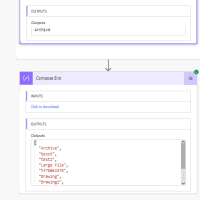
However, the same methodology can also be used with any other action as described in The advanced Pieter’s method in Power Automate.
Idea 3 – Query Json
Do you know how to query JSON? In my post Query JSON in Power Automate you will find all the details. Why would I bother with this complicated stuff?
Well, understanding how JSON queries work makes the big difference in my opinion between a developer and someone who develops solutions.
Within Power Automate JSON is used everywhere. Every step generates JSON code as show below. Now we can query data with functions like first and last to get specific records., but when we want to query properties…
[
  {
    Title: "Example from SharePains",
    Score: "90"
  },
  {
    Title: "Some other example",
    Score: "100"
  },
  {
    Title: "No score"
  }
]
Do you know the difference between these two examples:
Last(outputs('MyArray'))?['Score']and
Last(outputs('MyArray')).ScoreIn my post referenced post you will find the answer.
Idea 4 – Include a link to flow runs in your Catch scope
Using the Workflow function we can construct the flow run of the active flow run. This is very helpful in combination with the Try-Catch Pattern.
https://make.powerautomate.com/environments/@{workflow().tags.environmentName}/flows/@{workflow().id}/runs/@{workflow().run.name}
Idea 5 – State Machine flows
I called this idea after the control available in Nintex Workflows. Personally I prefer to call this Status driven flows.
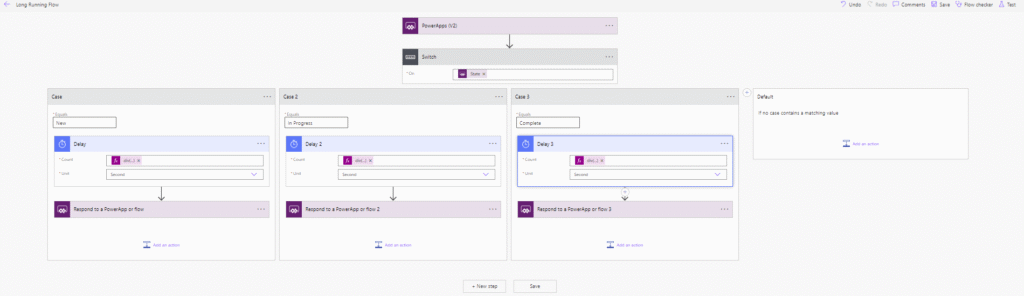
The general idea is that you have a record that goes through a multi phase process. For each step we use a Branch in a Switch to control that part of the process.
This means that the flow may be active for a short period of time and the end of a phase a status may be updated, triggering the next phase of the process. Especially with larger flows it makes it so much easier to keep things simple. Each branch of course could be implemented with a child flow as well.
Further thoughts
There are of course so many more posts that I could have include in this blast from the past post. But with the above 5 posts, I’m covering just the fundamental patterns that every flow developer should use within their flows.
Which patterns have you found most helpful? Maybe some of the patterns that I didn’t even include here.
Discover more from SharePains
Subscribe to get the latest posts sent to your email.
Pieter Veenstra

Is your business still running on paper trails, sprawling Excel files, or ageing Access databases? There's a better way — and I can show you exactly what it looks like. I'm the Technical Director of Vantage 365, a Microsoft solutions consultancy working with clients across the UK, the Netherlands, and worldwide. For over 30 years I've been turning messy, manual business processes into clean, automated systems that save time, reduce errors, and give teams the visibility they need to make better decisions. SharePains is not just any blog run by a Microsoft MVP. Have you ever used Try-Catch in Power Automate? The original post about Try-Catch in Power Automate can still be found on this site, https://sharepains.com/2018/02/07/try-catch-finally-in-power-automate-flow/ Or have you ever used the Pieter’s method to avoid variables and speed up your flows? https://sharepains.com/2020/03/11/pieters-method-for-advanced-in-flows/ You can contact me using contact@sharepains.com