
In my client’s SharePoint site there are a number of lists where multiple views with similar names have been created. (e.g. All Items and AllItems”). Rather than going through every list and checking where the double views have been created I used the PowerShell commands from the PnP framework to list all the views in all the sites.
To collect the credentials for the user that I’m running as I run the following command:
$cred = Get-Credential -Message "Please Supply password" -UserName "Pieter.Veenstra@myportal.onmicrosoft.com"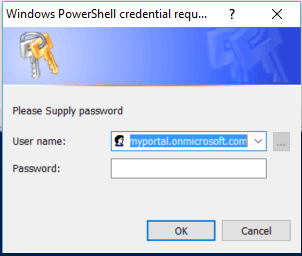
To connect to SharePoint online:
$siteUrl = "https://myportal.sharepoint.com"
Connect-SPOnline -Url $siteUrl -Credentials $cred
Ok, so now I’m connected to my SharePoint online root site.
First of all I’m going to get the root web and then I’m going to call a function Get-AllViews. The Get-AllViews function will list all views for a site and all its sub sites. The Get-AllViews doesn’t exist yet, but I’m going to give the details of that function later on in this post.
$rootWeb = Get-SPOWeb
Get-AllViews($rootWeb)
Get-AllViews
I’m starting with an empty function. I’m going for the simple function style rather than the more complicated style as described in my other post
function Get-AllViews ($myWeb)
{}
I want the Get-AllViews function to display
The site, List and view names in different colours.
I’m going to start with displaying the site’s Title and Url.
function Get-AllViews ($myWeb)
{
$webUrl = $myWeb.Url
$webTitle = $myWeb.Title
Write-Host -ForegroundColor Cyan "$WebTitle($WebUrl)"
}
Now I’m getting the lists within my web and I’m going to display the list Titles in yellow
$lists = Get-SPOList -Web $myWeb

foreach ($list in $lists)
{

Write-Host -ForegroundColor Yellow  $list.Title

}
Now I’m picking up the context with Get-SPOContext and loading the views in my lists. Displaying the list names is now easy:
$lists = Get-SPOList -Web $myWeb

foreach ($list in $lists)
{
Write-Host -ForegroundColor Yellow  $list.Title

$ctx = Get-SPOContext
$ctx.Load($list.Views)
Execute-SPOQuery

$views = $list.Views
foreach ($view in $views)
{
$ctx = Get-SPOContext
$ctx.Load($view)
$ctx.ExecuteQuery()
$view.Title
}
}
Then when I listed all the views for the site I’m repeating the same process for all the sub sites:
$subwebs = Get-SPOSubWebs

foreach ($subweb in $subwebs)
{
Get-AllViews $subweb
}
The full script
Clear-Host

$cred = Get-Credential -Message "Please Supply password" -UserName "Pieter.Veenstra@myportal.onmicrosoft.com"

$siteUrl = "https:/ /myportal.sharepoint.com"

Connect-SPOnline -Url $siteUrl -Credentials $cred

$rootWeb = Get-SPOWeb

Get-AllViews($rootWeb)
function Get-AllViews ($myWeb)
{
$webUrl = $myWeb.Url
$webTitle = $myWeb.Title
Write-Host -ForegroundColor Cyan "$WebTitle($WebUrl)"

$lists = Get-SPOList -Web $myWeb
foreach ($list in $lists)
{
Write-Host -ForegroundColor Yellow  $list.Title

$ctx = Get-SPOContext
$ctx.Load($list.Views)
Execute-SPOQuery

$views = $list.Views
foreach ($view in $views)
{
$ctx = Get-SPOContext
$ctx.Load($view)
$ctx.ExecuteQuery()
$view.Title
}
}
$subwebs = Get-SPOSubWebs

foreach ($subweb in $subwebs)
{
Get-AllViews $subweb
}

}
Pieter Veenstra

Is your business still running on paper trails, sprawling Excel files, or ageing Access databases? There's a better way — and I can show you exactly what it looks like. I'm the Technical Director of Vantage 365, a Microsoft solutions consultancy working with clients across the UK, the Netherlands, and worldwide. For over 30 years I've been turning messy, manual business processes into clean, automated systems that save time, reduce errors, and give teams the visibility they need to make better decisions. SharePains is not just any blog run by a Microsoft MVP. Have you ever used Try-Catch in Power Automate? The original post about Try-Catch in Power Automate can still be found on this site, https://sharepains.com/2018/02/07/try-catch-finally-in-power-automate-flow/ Or have you ever used the Pieter’s method to avoid variables and speed up your flows? https://sharepains.com/2020/03/11/pieters-method-for-advanced-in-flows/ You can contact me using contact@sharepains.com


Nice article. I was able to get all views in the site. Can we achieve the same using PnP? I could not find equivalent command for Get-AllViews in PnP.
All -SPO cmdlets were replaned by the -PNP equivalent ones.
The get-allviews is a function in the above script.