
Many years ago one of my customers had 4 environments for each of their IT systems. But for some reasons many people take a risk and only use one environment for SharePoint Online.
Environment setup
- Live
- Like-Live (this is where you test your issues in production)
- Test
- Development

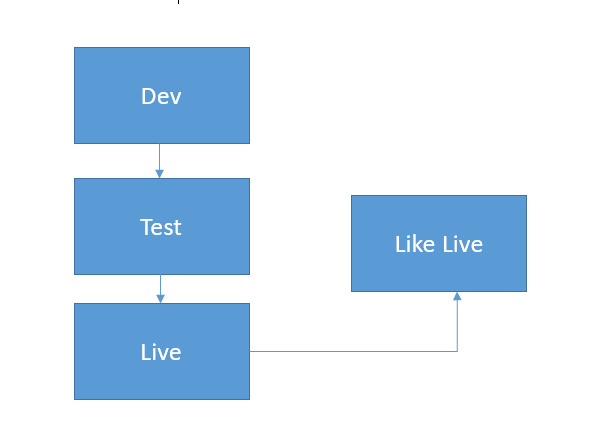
I’ve now worked with SharePoint for many years and I have found that many organisations only use a production, and when lucky, a test environment. Very few companies are using all of the 4 above environments.
When using on-premises farms I can understand the choice of reducing the number of environments however when using Office 365 this choice seems to be stranger as servers don’t need to be kept in sync. At least it is not something that we need to worry about as Microsoft will do this for us.
Quite often my customers ask me the question can I not just create multiple site collections?
Well what would the risks be?
Each site collection has its own configuration of columns, content types, lists and libraries so what is the issue?
There are quire a few things that are not stored within site collections and these are the things that you would risk by not having sufficient environments.
Within Office 365 you would be sharing the following services across the different environments:
- Term stores
- Search configuration (and results)
- Records Center
- Business Connectivity Services
- Other services that you used to find in Central Admin in on-premises SharePoint versions.
So any changes that are needed to the above services are done straight into your production environment. Is that really what you want to do? Just some tenants with only a few users would reduce your risk a lot!
[polldaddy poll=9617609]
Do you want to reduce your Office 365 risks too?
Next post: How to synchronize my environments.
Pieter Veenstra

Is your business still running on paper trails, sprawling Excel files, or ageing Access databases? There's a better way — and I can show you exactly what it looks like. I'm the Technical Director of Vantage 365, a Microsoft solutions consultancy working with clients across the UK, the Netherlands, and worldwide. For over 30 years I've been turning messy, manual business processes into clean, automated systems that save time, reduce errors, and give teams the visibility they need to make better decisions. SharePains is not just any blog run by a Microsoft MVP. Have you ever used Try-Catch in Power Automate? The original post about Try-Catch in Power Automate can still be found on this site, https://sharepains.com/2018/02/07/try-catch-finally-in-power-automate-flow/ Or have you ever used the Pieter’s method to avoid variables and speed up your flows? https://sharepains.com/2020/03/11/pieters-method-for-advanced-in-flows/ You can contact me using contact@sharepains.com


Good post! We are the same – 4 environments for software development, 1 environment for Office 365.