
Currently I’m implementing an appraisal process for one of my customers using Nintex Workflow and Nintex Forms.
My initial thought was to create an appraisal form a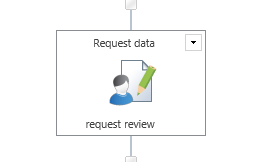 nd then create a workflow with a number of Request Data tasks as the form bounces between the reviewee and the reviewer.
I have however always found that tasks quite quickly become a pain to manage. Especially in processes that are form driven rather than workflow driven.
So I started to introduce some additional fields on my appraisal form content type.
- Complete Y/N

- Completion Comment
- Appraisal Status
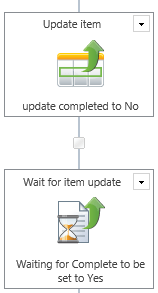
Then I replaced each task with an update item task in which the Complete is set to No and a wait for Complete to be set to Yes. Additionally I’m sending out an email alerting the user that they need to do something to the form.
In my process I’m still having some tasks, however I’ve reduced the number of tasks a lot now. At the final part of my process the reviewee is asked to accept the review. As this doesn’t require any updates to the form I’ve decided to implement this as a task.
My Conclusions
It’s not always a good idea to default to tasks when user interaction is part of a workflow, however it is also not good to avoid tasks all the time. In the past when I implemented task heavy processed I ended up copying data between task and workflow item resulting in complex workflows.
Do you have any different experiences then please leave a comment below.
Pieter Veenstra

Is your business still running on paper trails, sprawling Excel files, or ageing Access databases? There's a better way — and I can show you exactly what it looks like. I'm the Technical Director of Vantage 365, a Microsoft solutions consultancy working with clients across the UK, the Netherlands, and worldwide. For over 30 years I've been turning messy, manual business processes into clean, automated systems that save time, reduce errors, and give teams the visibility they need to make better decisions. SharePains is not just any blog run by a Microsoft MVP. Have you ever used Try-Catch in Power Automate? The original post about Try-Catch in Power Automate can still be found on this site, https://sharepains.com/2018/02/07/try-catch-finally-in-power-automate-flow/ Or have you ever used the Pieter’s method to avoid variables and speed up your flows? https://sharepains.com/2020/03/11/pieters-method-for-advanced-in-flows/ You can contact me using contact@sharepains.com

