
How often do you want to enable controls for owners only when you work with Power Apps?
Many applications have some debug screens or little help features that you need as a developer however you don’t want your users to have visibility of these controls. You could hide these controls until you need them and then make them visible again when you need them.
There must be a better way!
Owners, Co-Owners and Users
Power Apps has 3 types of users.
- Owners
- Co-Owners
- Users
The Owner created the app originally and can share it with other people and give them edit permissions. User can just play the app and use it.
Enable controls for owners
Ideally, I want to make my app as simple as this:

Depending on a variable I can display a text or enable or disable a button, icon or any other control.
Adding a Timer
The following code is using the PowerAppsforAdmins and the PowerPlatformforAdmins connectors to get the details of the current app.
The code could be added to the App start however this will slow down the start of my app and I don’t want that. Therefore I’m adding this to a timer that will set my isOwner after the app has been started. My thought here is that it is ok for the advanced options to appear a little later.
Set(
    isOwner,
    First(
        Filter(
            PowerAppsforAdmins.GetAdminApps(
                First(
                    Filter(
                        PowerPlatformforAdmins.GetAdminEnvironment().value,
                        properties.displayName = "Pieter Veenstra MVP (default) (org0681189e)"
                    )
                ).name
            ).value,
            properties.displayName = "Owner App"
        )
    ).properties.owner.email = User().Email
);
For the above code to work, all I needed was the Environment Display name and the display name of the app. You could hard code this if you want to speed things up a bit.
Identify a Co-Owner
Now I need to identify the Co-Owners but where earlier I was able to use properties.owner from the app. There isn’t anything for co-owners
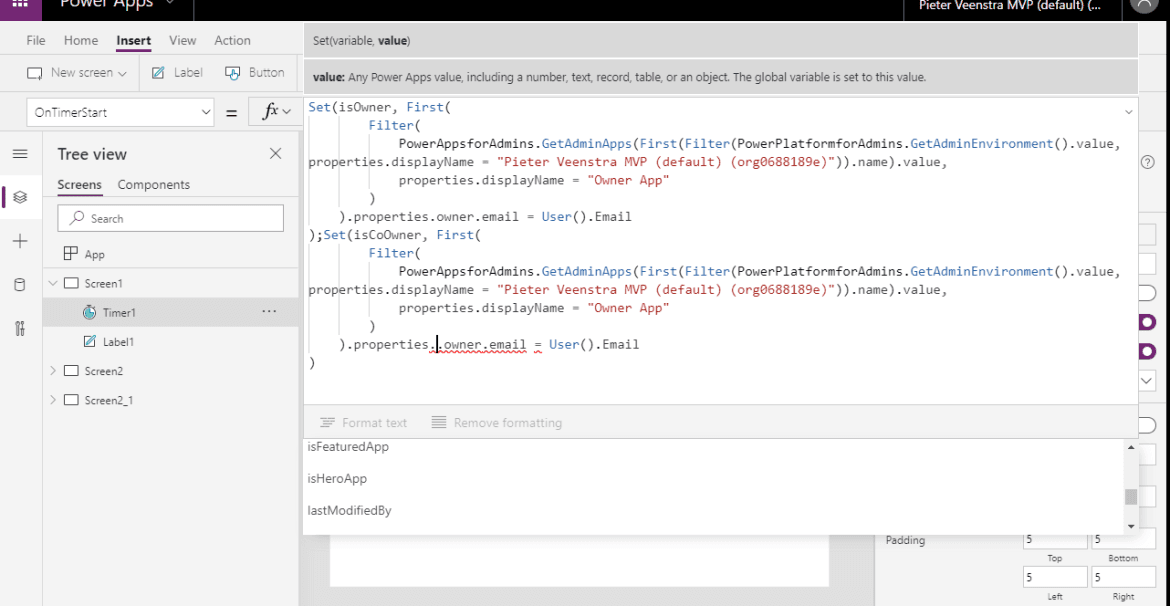
Time to have a second thought on this.
Last Modified By
How using the Last Modified By property?
Set(
    isEditor,
    First(
        Filter(
            PowerAppsforAdmins.GetAdminApps(
                First(
                    Filter(
                        PowerPlatformforAdmins.GetAdminEnvironment().value,
                        properties.displayName = "Pieter Veenstra MVP (default) (org0688189e)"
                    )
                ).name
            ).value,
            properties.displayName = "Owner App"
        )
    ).properties.lastModifiedBy.email = User().Email
)
Now all we have to do is save the app and all the controls controlled by isEditor will become visible to only you. As there can only be one editor any any one time anyway, the use of last modified by seems to be a good option to enable controls for owners.
Pieter Veenstra

Is your business still running on paper trails, sprawling Excel files, or ageing Access databases? There's a better way — and I can show you exactly what it looks like. I'm the Technical Director of Vantage 365, a Microsoft solutions consultancy working with clients across the UK, the Netherlands, and worldwide. For over 30 years I've been turning messy, manual business processes into clean, automated systems that save time, reduce errors, and give teams the visibility they need to make better decisions. SharePains is not just any blog run by a Microsoft MVP. Have you ever used Try-Catch in Power Automate? The original post about Try-Catch in Power Automate can still be found on this site, https://sharepains.com/2018/02/07/try-catch-finally-in-power-automate-flow/ Or have you ever used the Pieter’s method to avoid variables and speed up your flows? https://sharepains.com/2020/03/11/pieters-method-for-advanced-in-flows/ You can contact me using contact@sharepains.com