
In this post I will have a look at changing some of the Power apps tenant settings using Get-TenantSettings and Set-TenantSettings.
Survey Feedback
Last week one of my business critical Power Apps 4 Kids apps got the following survey feedback form.
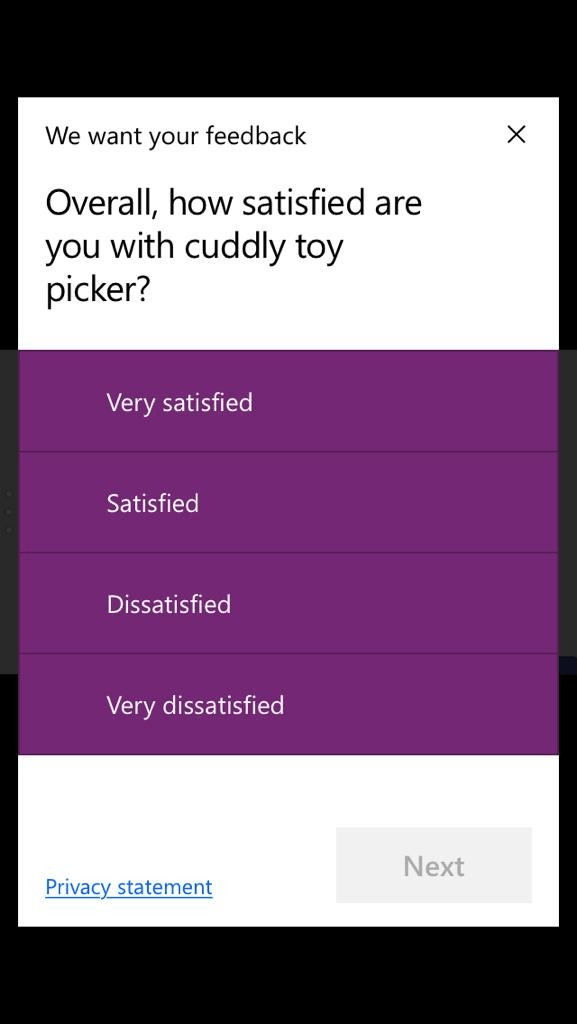
There might be a good place for these forms, but in this case my users really didn’t want to see this form as it stopped them from doing their daily tasks.
Power apps Powershell
To remove this feedback form you will need to install PowerShell for Power Apps . Once you have completed these steps you will have the Get-TenantSettings and the set-TenantSettings Commands available.
Get-TenantSettings
First I’m going to have a look at the Get-TenantSettings.
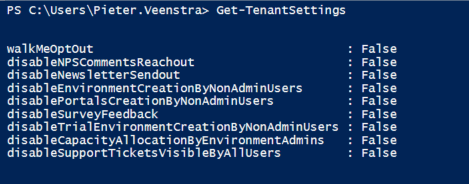
When you run this command a list of settings is returned.
- walkMeOptOut
- disableNPSCommentsReachout
- disableNewsletterSendout
- disableEnvironmentCreationByNonAdminUsers
- disablePortalsCreationByNonAdminUsers
- disableSurveyFeedback
- disableTrialEnvironmentCreationByNonAdminUsers
- disableCapacityAllocationByEnvironmentAdmins
- disableSupportTicketsVisibleByAllUsers
As shown in the above screenshot these settings have all been enabled.
Personally I would have liked to see enable settings being set to true as these double negatives will only be confusing.
It look s like I’m after the disableSurveyFeedback setting
Set-TenantSettings
Now you might expect that the Set-TenantSettings will make your life easy and give you a -DisableSurveyFeedback option but that is not there!
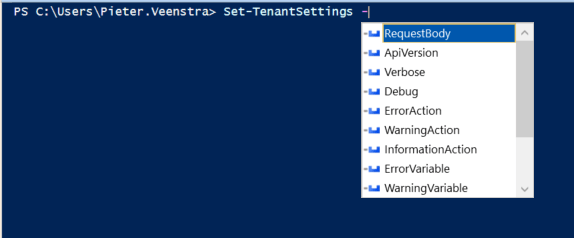
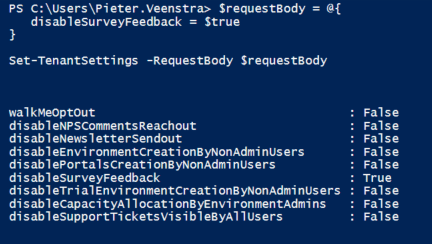
We will first need to create a RequestBody. this can be done with the following lines of PowerShell
$requestBody = @{
   disableSurveyFeedback = $true
}
Now that we have a request body we can run the Set-TenantSettings as shown below:
Set-TenantSettings -RequestBody $requestBody
Running all of the code together now gives me a tenant where the feedback form is not presented to my users anymore.
Do you need some more help on this setting then you could also have a look at Daniel’s video about the Set-TenantSettings
Pieter Veenstra

Is your business still running on paper trails, sprawling Excel files, or ageing Access databases? There's a better way — and I can show you exactly what it looks like. I'm the Technical Director of Vantage 365, a Microsoft solutions consultancy working with clients across the UK, the Netherlands, and worldwide. For over 30 years I've been turning messy, manual business processes into clean, automated systems that save time, reduce errors, and give teams the visibility they need to make better decisions. SharePains is not just any blog run by a Microsoft MVP. Have you ever used Try-Catch in Power Automate? The original post about Try-Catch in Power Automate can still be found on this site, https://sharepains.com/2018/02/07/try-catch-finally-in-power-automate-flow/ Or have you ever used the Pieter’s method to avoid variables and speed up your flows? https://sharepains.com/2020/03/11/pieters-method-for-advanced-in-flows/ You can contact me using contact@sharepains.com

