This post is all about error handling and parallel branches.
General error handling in Power Automate
In the past I’ve written quite a few posts about the Try-Catch pattern. Which handles a lot of error handling issues. Yesterday I was asked about how to handle errors in parallel branches.
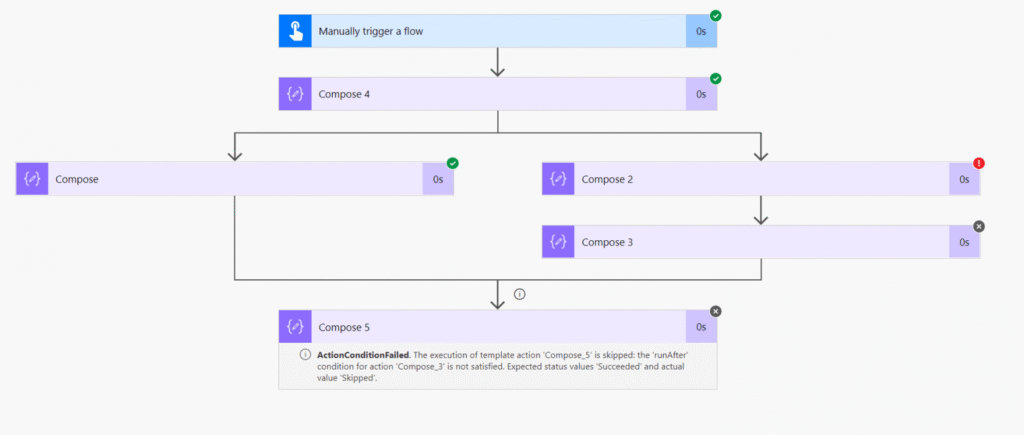
As an example I build the following flow with parallel branches in Power Automate:

Just a bunch of compose actions. Compose 2 in the right branch is failing. Then Compose 3 is skipped as its previous step failed. And then Compose 5 has all the run after settings set.
What would you expect to happen with Compose 5 will it run?
Well I put it to the test. and Compose 5 is skipped.
So how should we handle the error? We want compose 5 to run!
Time to look at some of my try catch posts again.
How about creating a try catch in both my parallel branches? For simplicity sake I’m only building it in the right one, but each branch should have a try catch in it.
The catch’s run after settings are to include failed and skipped and potentially you should also include the timed out option
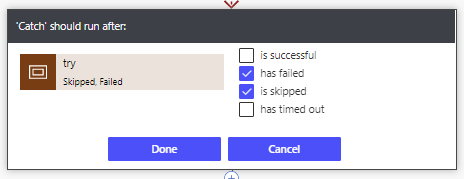
And now my flow runs successfully.

Why?

Well, we need to look at the Run after settings a bit more and I’m going to go back to the version of the flow without the try and catch pattern applied.

You migth think that this flow is now going to run for all states, but it is not.
Note on the right hand side the two boxes! Compose and Compose 3. Click on Compose 3 and you will see the answer to our question!
We need to zoom on on that Compose 5 action.
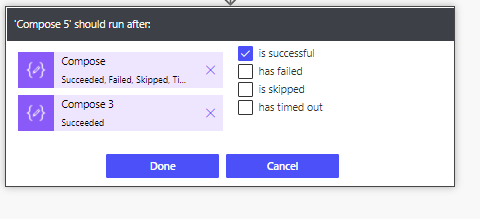
For each last action in each branch you can set a separate run after settings. Thanks John Liu for pointing this out.
The preceding options are clearly listed on the left hand side. However that they are clickable wasn’t obvious.
For error handling in parallel branches it is important to understand that you can click on this actions on the left hand side of the run after settings.
Other Error handling posts
Advanced Error Handling and recovery from failure/
Power Automate error handling for small flows/
https://sharepains.com/2018/07/16/Error 429, rate limit is exceeded try again in x seconds/
Pieter Veenstra

Is your business still running on paper trails, sprawling Excel files, or ageing Access databases? There's a better way — and I can show you exactly what it looks like. I'm the Technical Director of Vantage 365, a Microsoft solutions consultancy working with clients across the UK, the Netherlands, and worldwide. For over 30 years I've been turning messy, manual business processes into clean, automated systems that save time, reduce errors, and give teams the visibility they need to make better decisions. SharePains is not just any blog run by a Microsoft MVP. Have you ever used Try-Catch in Power Automate? The original post about Try-Catch in Power Automate can still be found on this site, https://sharepains.com/2018/02/07/try-catch-finally-in-power-automate-flow/ Or have you ever used the Pieter’s method to avoid variables and speed up your flows? https://sharepains.com/2020/03/11/pieters-method-for-advanced-in-flows/ You can contact me using contact@sharepains.com