

For quite a few years now I’ve promoted the Try-Catch error handling pattern. But there is a new approach on its way with the Flow Run table.
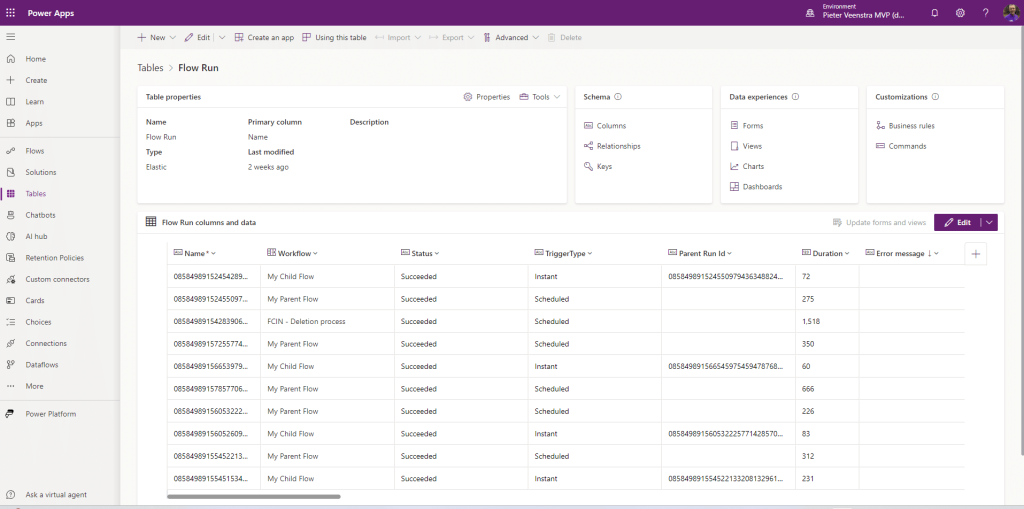
The Flow Run Table
Within Dataverse you can now find the Flow Run table. The Flow Run table has a record for every run of a flow. This includes the status, trigger type, parent flow run IDs and so much more. A column Error Message (which doesn’t appear to be set yet) also seems to be a useful piece of information.
Notice that this new Flow Run table is an elastic table.
An elastic table is a data table managed by Dataverse designed to handle large volumes of data in real-time. With elastic tables, developers can import, store, and analyze large volumes of non-relational data without scalability, latency, or performance issues, even automatically scaling to ingest and read tens of millions of rows every hour.
How to enable this feature
All you have to do is go to your Environment settings then find the following Features and enable it:

So how can we use this?
Replacing the try-catch error handling
Well one of the negatives of the Try-Catch pattern is that we will be adding the same scope boxes with the same email in every single flow that we have. This is cluttering the actual flows.
We could now simply have a flow triggering on the Flow Run table, and then send out our email with the flow run URL to report the issue. Now we only have to include the following flow in each of our?environments to do exactly the same:

I would include a try catch in the error handling flow. Just in case the error handling flow is failing. Although that could of course also be handled by the above flow. Care should of course be taken that we don’t end up in an endless loop. So excluding the error handling flow from the above pattern might be a good idea anyway.
Does this really replace the Try-Catch?
Not really.
Quite often, I would want my flows to complete specific steps to recover from a failure, however the simple reporting of the errors could quite well be handled with the above steps instead of the Try Catch pattern.
So for example, if I had a flow that provisioned a SharePoint site and the provisioning process would fail due to time out issues, then I would probably want my flow to retry the provisioning process at a quieter time.
Also, the Error messages currently aren’t recorded yet. where you might want to inform someone of the failure details in the email that you send them.
But in short, this is a great improvement, to simplify the whole error handling in Power Automate and Dataverse.
Some concluding thoughts
If you use the Flow run table as part of your governance around the Power Platform, then including these tables in your Model Driven Apps of course is a must. Securing these tables of course will be needed, but it would help to identify issues straight from within the apps that you develop.
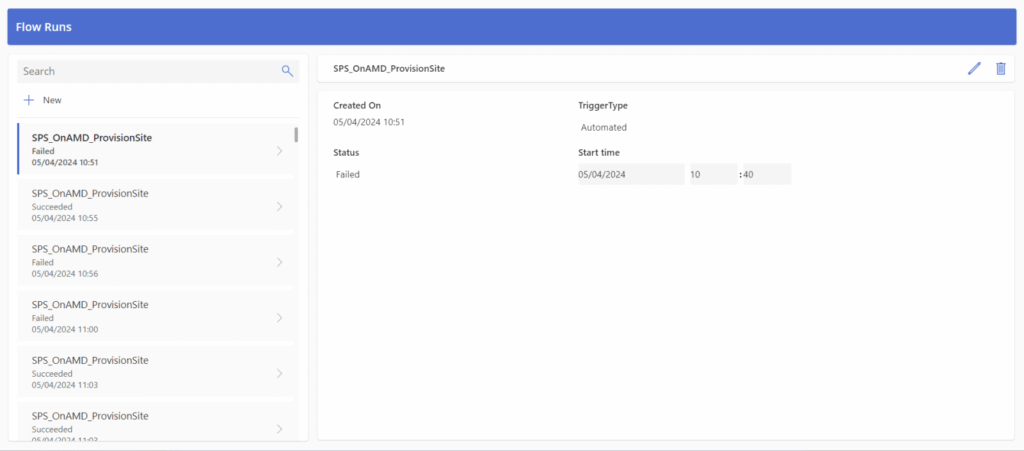
Or if you prefer a canvas app, the following app can be developed within 5 minutes.
Pieter Veenstra

Is your business still running on paper trails, sprawling Excel files, or ageing Access databases? There's a better way — and I can show you exactly what it looks like. I'm the Technical Director of Vantage 365, a Microsoft solutions consultancy working with clients across the UK, the Netherlands, and worldwide. For over 30 years I've been turning messy, manual business processes into clean, automated systems that save time, reduce errors, and give teams the visibility they need to make better decisions. SharePains is not just any blog run by a Microsoft MVP. Have you ever used Try-Catch in Power Automate? The original post about Try-Catch in Power Automate can still be found on this site, https://sharepains.com/2018/02/07/try-catch-finally-in-power-automate-flow/ Or have you ever used the Pieter’s method to avoid variables and speed up your flows? https://sharepains.com/2020/03/11/pieters-method-for-advanced-in-flows/ You can contact me using contact@sharepains.com

Hi Pieter. Thanks for the tip! I do see the Flow Run table but no data in this table. Even as a Environment / Power Platform Admin – no flow runs visible. Do I need to configure this or is it still in rollout? Thanks
Hi Patrick, I checked in a few of my tenants across the world and they seem to be populating the table. I wonder if there are some other restrictions. Do you have flows running within solutions?
I think this feature is still updated for different tenants. I checked multiple tenants from Europe, and I can see the Flow Run table, but there is no data gathered. I know these environments have flow running both inside and outside solutions.
Hi Pieter. We do have premium and we have flows in and out of solutions. The table is empty. It indicates that it was created 2 weeks ago.
Apparently not all tenant locations have this yet. Which location are you in?
I’m not exactly how to find out, the environment region shows United States.
That location should be fine. I have seen the new table with content in the US, Canada and UK.
Maybe the update frequency in your environment that makes the difference.
Thank you for sharing this. Something to note is that you need a premium licence of some sort as dataverse is a premium connector.
Yes indeed you do need premium, but then you would also need that if you were you use the API that can give you similar details.
Thanks for the information
Hi Pieter
Happy New Year !
Did I miss it but what is the details of the condition in the flow ?
I suspect it is something if Error Message is Blank ?
Am I correct ?
Thanks
Nigel
The idea is that you can read the table for any errors. So just one flow triggeringnon that table.
You might still have the additional try catch inside the flow as well though. But that might become less important.
In US and there is no data in this Flow Run table. Why?
It is still experimental and not fully rolled out. I have seen it in environments in the UK and Canada.
Hi Pieter,
I am also waiting for the table to start showing data. My region is Canada, I created a solution, added this table and the flow you described then added another flow that will error out (for testing) but that Flow Runs table was still blank. Does the environment need to be created recently? My environ was created at least 5 months ago.
Thank you,
Mohammed
I have seen this work in older environments. I am not sure when this is enabled or not. Anyway, it is something good on the way.
Hello,
The trigger doesn’t work for me. I see the Flow Runs table, which has many values.
I set it to trigger when a new row is added, but it will not trigger.
I’m a global admin to the o365 tenant, and I have full access as a system administrator to the Environment.
I can trigger other tables, but the Flow Runs table is giving me issues.
Do I need to do anything special to make it trigger for that table?
Regards,
Evie
You might have to use a scheduled flow and query for recent updates. This table is an elastic table and I wouldn’t be surprised if the usual triggers didn’t work on that.