

This post is all about some issues that I ran into yesterday. Multiple developers worked on one flow in Power Automate and my app in Power Apps broke.
When apps break due to multiple developers working on a flow!
It is not uncommon?to remove a flow and then readd a flow in your app, when things go wrong. So in my case the flow didn’t want to run and I couldn’t immediately see what was going on. So I removed the flow in question then I readded the flow back into the app only to be given the following error

There was a problem adding your service. Please try again later
And the Power Platform forums weren’t immediately helpful either. That is not very helpful at all. Maybe some more useful information under the More link
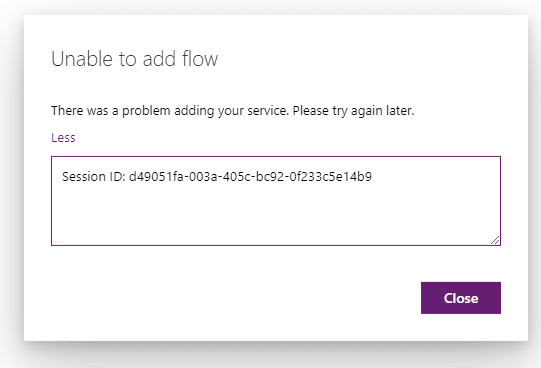
Still pretty useless. It would be good to see some more details here. In my case I first blamed other connections for this issue. Hopefully one day these error dialogues will include useful clues.
Detailed look at the flow
Originally the flow was created by Lucy Eaver and the flow was working as expected.

The flow was developed within a solution and we have an app, a connection reference and a flow all wrapped up in the solution. So far so good.

Then another developer arrived and changed the?flow by adding another Dataverse action to the existing steps in the flow.

Now my app stopped working and decided to take the flow out of the app so that it could be re-added.
And this is where the unable to add my above mentioned flow error appeared.
So why can’t we add this flow to the app? We have to connections to Dataverse and each of these connections are owned by different user accounts.
How to fix the multiple developer issue?
I’m first going to have a look at the connection references. The connection used here can be found when editing the connection reference in the solution.

Then find the connection in question (outside the solution) and we could consider here sharing connections. But that doesn’t really solve any problems.

The real problem here is that we have one flow with two connections to the same connector.?In this case it is the Dataverse connector but I often see the same with SharePoint, Outlook ar really any other commonly used connector.

And the developer adding the?steps may not even realise the damage that they are doing to the flow and calling app. Because they only added one small step.
Multiple Developers, the way forward!?
You could consider doing all of the development work under a share account. Or you could make sure that every developer has access to all the connections within the flow. But all of this is not easy.

In this case I’m not even looking at the mess that could have been created with flows and apps that are not in a solution package.
The first step in this case is to make the app/flow work again. So the easiest way to do this is to make sure that only one of each type connection is used within the flow. Once you have switched over the connections you will find that the flow overview screen will only show for example one Dataverse connection.
Then as a next step you could consider giving every developer their own development environment. When they are done with their work they can then deploy to a central development environment. In this central development environment all the work done by each developer are merged and connections are all owned by a shared account. However this becomes potentially a lot of overhead to get some small development done.
Pieter Veenstra

Is your business still running on paper trails, sprawling Excel files, or ageing Access databases? There's a better way — and I can show you exactly what it looks like. I'm the Technical Director of Vantage 365, a Microsoft solutions consultancy working with clients across the UK, the Netherlands, and worldwide. For over 30 years I've been turning messy, manual business processes into clean, automated systems that save time, reduce errors, and give teams the visibility they need to make better decisions. SharePains is not just any blog run by a Microsoft MVP. Have you ever used Try-Catch in Power Automate? The original post about Try-Catch in Power Automate can still be found on this site, https://sharepains.com/2018/02/07/try-catch-finally-in-power-automate-flow/ Or have you ever used the Pieter’s method to avoid variables and speed up your flows? https://sharepains.com/2020/03/11/pieters-method-for-advanced-in-flows/ You can contact me using contact@sharepains.com

A couple of comments. First off, we always use a shared account. Other than the problems encountered above, this facilitates when a developer leaves the organization and also facilitates easily viewing all the connections, i.e. in my own user account, I seem to see mainly only the connections I made, and not all the connections.
Secondly, for many connectors, such as SharePoint, I have not seen a way to “name” connections, so they are all called username@domain, which makes it even hard to see if you have multiple connections. Lastly I think the overhead, even in a solution, of a developer modifying a copy of a flow and then reintegrating sounds like a lot of overhead. Too bad MS didn’t develop a better working environment.
As a note, we have started using FlowStudio and have found it so much better than the MS interface for monitoring and accessing flows.
It would be nice if connections could be managed separately from the flows. The concept of owner isn’t really needed but run as user is a better idea. Including run as the logged in user.
At the moment it isn’t clear when adding a step results in creating a new connection or if it it uses an existing one.
This is certainly a challenge! I agree, wish the connections could be managed separately. Collaborating on a flow ends up being a pain in the you know what.
Thanks Pieter for sharing your experience. It will definitely save other times if faced the same error. And looking forward to have more on multiple deplopment to deploy to central development environment.
Thanks
Atiq