Dates in Dataverse used by Power Apps and Power Automate can cause all sorts of challenges. How often have you had a date being an hour out from what you expect them to be?
Creating date fields in Dataverse
In this post I’ve created a table with 5 date fields. One for each variation possible. There are two relevant settings. First we have the format and then we have the time zone adjustment.

For Format we have the choice of Date and Time and Date Only.
Then depending on the option selected above there are two or three options available in the Time zone adjustments.
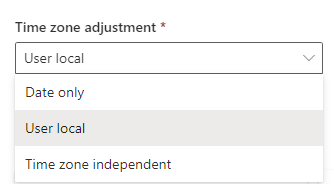
Notice that when you select time zone independent you cannot switch this back to any other setting. So be very careful when you want to try things out on an existing table that contains data already.
Now for my example I’ve created a table with the following 5 columns:

The name of each column describes the Format and the time zone adjustment that I selected.
Create a form in Power Apps
Now in Power Apps I created a form that will let me submit records to the table that I created.

First thing to notice here is that Power Apps form recognises the Date Only formatting of my column, but only if I have set the time zone adjustment to Date Only as well. For Time zone independent and User Local I’m being presented with the time controls.
This feels a bit wrong.
Now I selected 25 June 2024 10:30 AM (except for the field where there is no time controls given) When we look at the controls in the form we will see that there is an Hour control or not depending on the settings on my field. I would have hoped that there was some clever stuff here identifying the settings and then making controls visible or not.
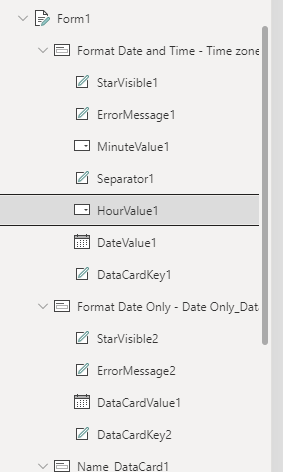
So this means that you might have to re-add the fields if you change the settings in the database.
Then when I use SubmitForm(Form1) to submit my form, I’m finding the following data in by database. So even though the app is asking for the time it isn’t being stored in the database.

Using Patch to set the dates in Dataverse to Today
Now I’m going to have a look at the next pain. We have our same 5 date fields again. This time however I’m setting the fields using the Today() function and I’m creating the record using the Patch function.

Within Dataverse we will see that the Date only columns save just the date and the Date and Time fields store 12:00 AM as their time. This is all as expected

But now if we read the data using the Dataverse connector in Power Automate, we will notice something strange:

I’m going to simplify that a bit by removing all the less interesting properties form our query:
[
  {
    "pv_name": "Save records all set to 10.30am 25 June 2024",
    "pv_formatdateonlytimezoneindependent@OData.Community.Display.V1.FormattedValue": "6/25/2024",
    "pv_formatdateonlytimezoneindependent@odata.type": "#DateTimeOffset",
    "pv_formatdateonlytimezoneindependent": "2024-06-25T10:30:00Z",
    "pv_formatdateandtimetimezoneindependent@OData.Community.Display.V1.FormattedValue": "6/25/2024 10:30 AM",
    "pv_formatdateandtimetimezoneindependent@odata.type": "#DateTimeOffset",
    "pv_formatdateandtimetimezoneindependent": "2024-06-25T10:30:00Z",
    "pv_formatdateandtimeuserlocal@OData.Community.Display.V1.FormattedValue": "6/25/2024 9:30 AM",
    "pv_formatdateandtimeuserlocal@odata.type": "#DateTimeOffset",
    "pv_formatdateandtimeuserlocal": "2024-06-25T09:30:00Z",
    "pv_formatdateonlydateonly@OData.Community.Display.V1.FormattedValue": "6/25/2024",
    "pv_formatdateonlydateonly@odata.type": "#Date",
    "pv_formatdateonlydateonly": "2024-06-25",
    "pv_formatdateonlyuserlocal@OData.Community.Display.V1.FormattedValue": "6/25/2024",
    "pv_formatdateonlyuserlocal@odata.type": "#DateTimeOffset",
    "pv_formatdateonlyuserlocal": "2024-06-25T09:30:00Z",
    "pv_mydatesid@odata.type": "#Guid",
    "pv_mydatesid": "12a7a517-0233-ef11-8e4e-6045bdfc4638"
  },
  {
    "pv_name": "Records Created with Patch",
    "pv_formatdateonlytimezoneindependent@OData.Community.Display.V1.FormattedValue": "6/25/2024",
    "pv_formatdateonlytimezoneindependent@odata.type": "#DateTimeOffset",
    "pv_formatdateonlytimezoneindependent": "2024-06-25T00:00:00Z",
    "pv_formatdateandtimetimezoneindependent@OData.Community.Display.V1.FormattedValue": "6/25/2024 12:00 AM",
    "pv_formatdateandtimetimezoneindependent@odata.type": "#DateTimeOffset",
    "pv_formatdateandtimetimezoneindependent": "2024-06-25T00:00:00Z",
    "pv_formatdateandtimeuserlocal@OData.Community.Display.V1.FormattedValue": "6/24/2024 11:00 PM",
    "pv_formatdateandtimeuserlocal@odata.type": "#DateTimeOffset",
    "pv_formatdateandtimeuserlocal": "2024-06-24T23:00:00Z",
    "pv_formatdateonlydateonly@OData.Community.Display.V1.FormattedValue": "6/25/2024",
    "pv_formatdateonlydateonly@odata.type": "#Date",
    "pv_formatdateonlydateonly": "2024-06-25",
    "pv_formatdateonlyuserlocal@OData.Community.Display.V1.FormattedValue": "6/24/2024",
    "pv_formatdateonlyuserlocal@odata.type": "#DateTimeOffset",
    "pv_formatdateonlyuserlocal": "2024-06-24T23:00:00Z",
    "pv_mydatesid@odata.type": "#Guid",
    "pv_mydatesid": "dddbe346-0333-ef11-8e4e-6045bdfc4638"
  }
]
When we put that into a table we will see what is happening:
| Input | Format | Time zone adjustments | Output |
| 25/04/2024 (Today) | Date and Time | User Local | 2024-06-24T23:00:00Z |
| 25/04/2024 (Today) | Date and Time | Time zone independent | 2024-06-25T00:00:00Z |
| 25/04/2024 (Today) | Date Only | User Local | 2024-06-24T23:00:00Z |
| 25/04/2024 (Today) | Date Only | Time zone independent | 2024-06-25T00:00:00Z |
| 25/04/2024 (Today) | Date Only | Date Only | 2024-06-25 |
When we look at this, we will find our 1 hour out problem. When you create a date field in Dataverse the Time zone adjustment is set to User Local by default. And this is potentially the right option as we would want the time to be corrected for the user that is running the flow/app.
If however we read the data from Dataverse and display the data in a gallery in a Canvas app the dates are correctly displayed. Do Power apps must be correcting the time zones (depending on the Time zone adjustment settings)
Finding the local time zone for a flow
The first challenge we have is finding the local time zone. Now I wrote a blog post about this quite a few years ago. Local Trigger time in Power Automate.
First we get the user id using the user email given to us by the trigger (or any other action that gives this to us).
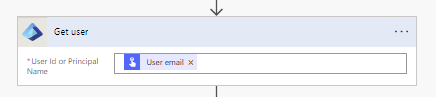
Then we call the endpoint to get the time zone of the user:
https://graph.microsoft.com/v1.0/users/@{outputs('Get_user')?['body/id']}/mailboxSettings/timeZoneAnd using the HTTP action we can now get the time zone for the user as described in the above mentioned post.
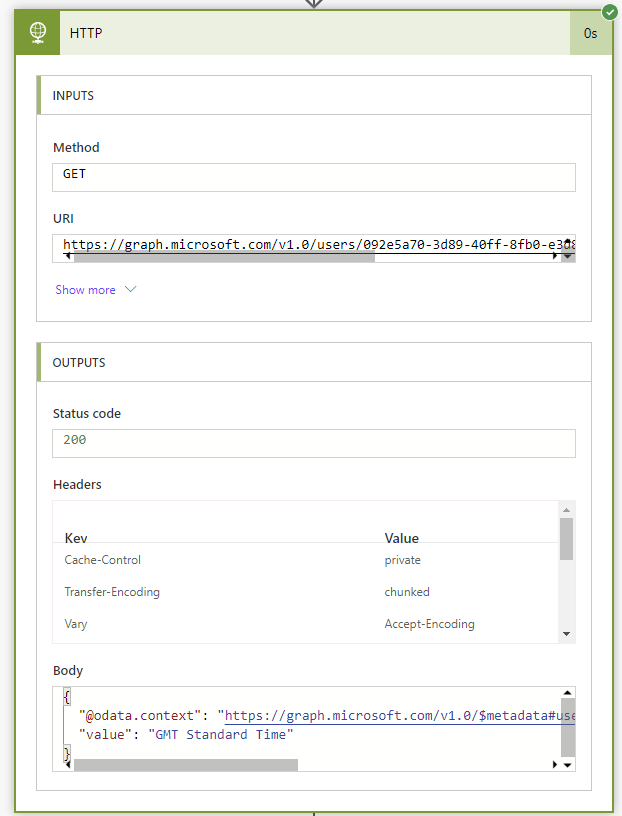
So now we have the time zone that the flow is running in
Now all we need to do is convert from UTC ( which Power Automate uses) to the user’s timezone using the following expression and we are up and running and have our dates converted:
convertTimeZone(UtcNow(), 'UTC', body('HTTP')?['value'])Nearly 1000 blog posts
As I’m getting close to my 1000th blog post. Don’t forget to enter the competition found in last week’s blog post. You can win too!
Pieter Veenstra

Is your business still running on paper trails, sprawling Excel files, or ageing Access databases? There's a better way — and I can show you exactly what it looks like. I'm the Technical Director of Vantage 365, a Microsoft solutions consultancy working with clients across the UK, the Netherlands, and worldwide. For over 30 years I've been turning messy, manual business processes into clean, automated systems that save time, reduce errors, and give teams the visibility they need to make better decisions. SharePains is not just any blog run by a Microsoft MVP. Have you ever used Try-Catch in Power Automate? The original post about Try-Catch in Power Automate can still be found on this site, https://sharepains.com/2018/02/07/try-catch-finally-in-power-automate-flow/ Or have you ever used the Pieter’s method to avoid variables and speed up your flows? https://sharepains.com/2020/03/11/pieters-method-for-advanced-in-flows/ You can contact me using contact@sharepains.com