
This time a short post with a quick win if you make a lot of similar workflows on SharePoint lists. I’m by no means a SharePoint Designer workflow expert and often I don’t like SharePoint Designer but today I came across a useful feature.
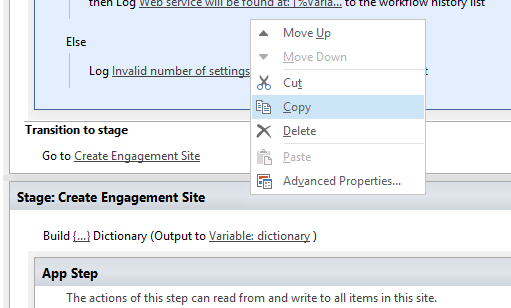
When you have a workflow you can copy paste your actions. Nothing new about that. Sometimes it even works and sometimes it copies half the action, such as for the Build Dictionary actions. Still nothing new.

But now comes my discovery for today.
I needed to create very similar but slightly different workflows. Both workflows are created as list workflows and I needed to copy about 5 out of 10 actions from one workflow to the other.
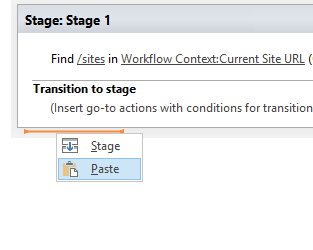
By opening two instances of SharePoint Designer 2013 copy past simply copies an action from one workflow to another workflow.

And more interestingly, you can even copy whole stages:
Pieter Veenstra

Is your business still running on paper trails, sprawling Excel files, or ageing Access databases? There's a better way — and I can show you exactly what it looks like. I'm the Technical Director of Vantage 365, a Microsoft solutions consultancy working with clients across the UK, the Netherlands, and worldwide. For over 30 years I've been turning messy, manual business processes into clean, automated systems that save time, reduce errors, and give teams the visibility they need to make better decisions. SharePains is not just any blog run by a Microsoft MVP. Have you ever used Try-Catch in Power Automate? The original post about Try-Catch in Power Automate can still be found on this site, https://sharepains.com/2018/02/07/try-catch-finally-in-power-automate-flow/ Or have you ever used the Pieter’s method to avoid variables and speed up your flows? https://sharepains.com/2020/03/11/pieters-method-for-advanced-in-flows/ You can contact me using contact@sharepains.com