
Recently Microsoft has added a lot of new modern out of the box web parts to SharePoint Online.
Customize pages with out of the box web parts
So if your approach is to keep customisation to the minimum then you might now find that your options to build a useful page have improved a lot.
Today I found out that there seems to be a difference between the web parts offered on a communication site and a team site.
Team sites

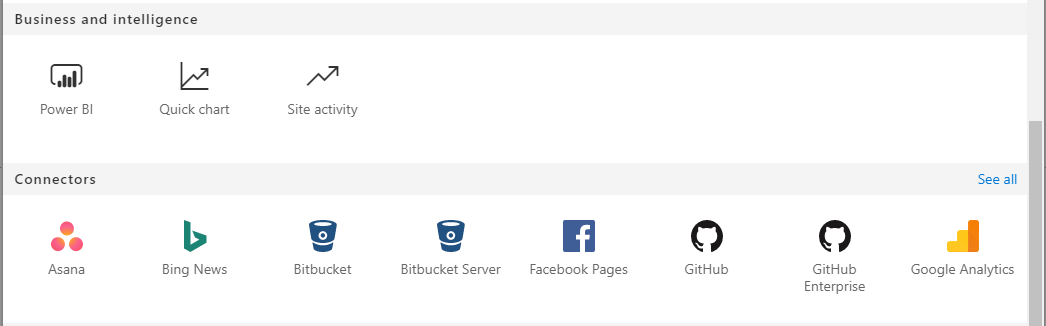
For team sites the web parts have been organised in 7 categories.
- Featured
- Text, media and content
- Discovery
- Communication and collaboration
- Business and Intelligence
- Connectors
- Other
Communication sites
For Communication sites you will find a similar set of web parts:
- Featured
- Text, media and content
- Discovery
- Communication and collaboration
- Business and Intelligence
- Other
The connector category however doesn’t exist on Communication sites. At the first moment I thought that this could be because the communication sites are all about making pages that are beautiful rather than doing something like integrating with existing applications, but then I looked at the connectors that are offered.
I could imagine that some people would like to include these on communication sites.
Pieter Veenstra

Is your business still running on paper trails, sprawling Excel files, or ageing Access databases? There's a better way — and I can show you exactly what it looks like. I'm the Technical Director of Vantage 365, a Microsoft solutions consultancy working with clients across the UK, the Netherlands, and worldwide. For over 30 years I've been turning messy, manual business processes into clean, automated systems that save time, reduce errors, and give teams the visibility they need to make better decisions. SharePains is not just any blog run by a Microsoft MVP. Have you ever used Try-Catch in Power Automate? The original post about Try-Catch in Power Automate can still be found on this site, https://sharepains.com/2018/02/07/try-catch-finally-in-power-automate-flow/ Or have you ever used the Pieter’s method to avoid variables and speed up your flows? https://sharepains.com/2020/03/11/pieters-method-for-advanced-in-flows/ You can contact me using contact@sharepains.com


This looks like the typical inconsistencies that are deployed without any supporting documentation to help us understand why they are different.