
A while back I write about a Try – Catch construction in Microsoft Flow. Within my Catch I then sent email with some limited information such as the title of the triggering item. This is of course great to identify the item causing the error but you might want more.
Flow Analytics
Then last week I wrote about Flow Analytics and finding your failed flow. Today I’m going to take this a bit further.
Something has gone wrong in my flow and I want to get the details within my flow:

Failing flow
So in this case I would like to include the status, message and source returned by my failing Get Item. I generated this error by trying to get item 0 from a list in SharePoint.
{
"status": 404,
"message": "Item Not Found\r\nclientRequestId: ffe594bf-a0ee-49eb-8ec2-d5663c537fcd\r\nserviceRequestId: c7666e9e-5046-5000-bd79-d17875df57cb",
"source": "https:/ /mytenant.sharepoint.com//_api/SP.APIHubConnector.GetListItem(listName='634dead0-b2c0-4a31-a11b-f548877c18ee',itemId='0')",
"errors": [
"-1",
"Microsoft.SharePoint.SPConnectorException"
]
}
You could now set 3 variable with
body('Get_Item')?['Status']
body('Get_Item')?['Source']
body('Get_Item')?['Message']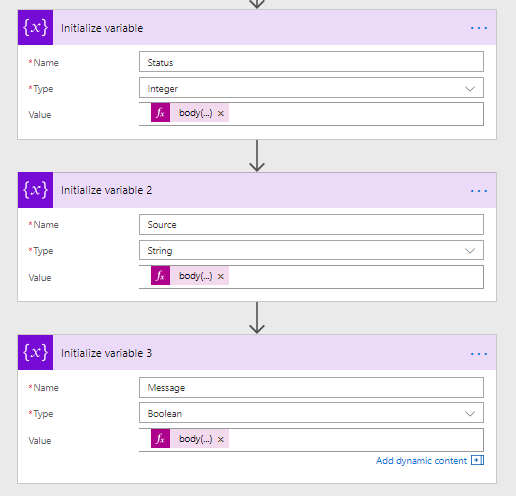
And this would probably work but would you really want to clutter your flows with these Set Variable actions every time you have an action that could fail?
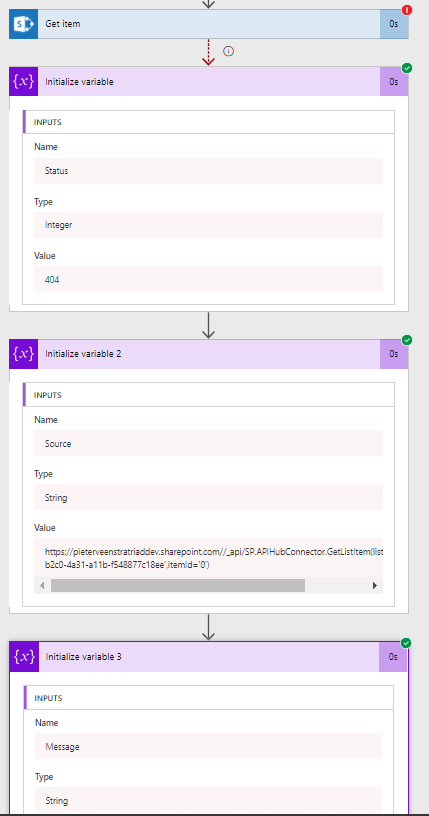
How can we handle the flow failures while still keeping control over the flows.
I’m going to go back to my Try / catch post.
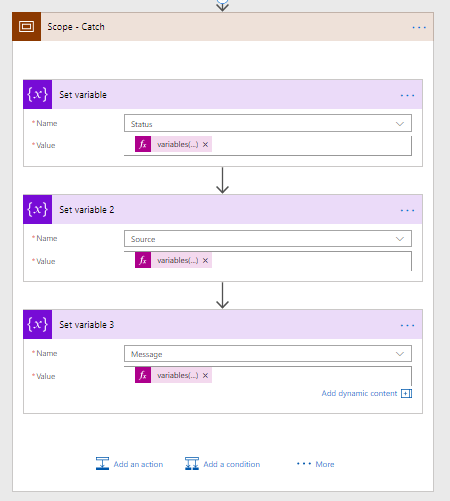
By moving my Set Variables into the Try / Catch we’re getting one step closer to where we want to be.
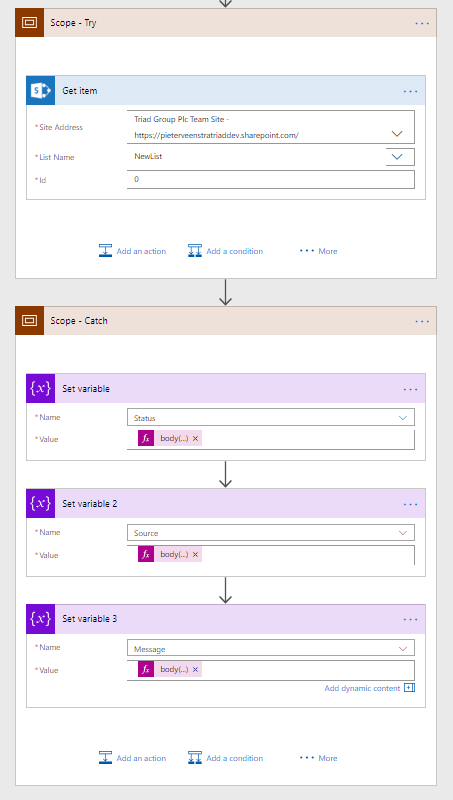
But now how do we handle a flow with many steps that could possible fail? We don’t just want to clutter the Scope – Catch action with a lot of actions collection the results form all potentially failing actions.
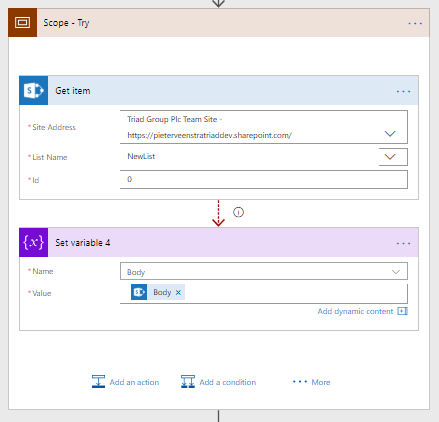
First after each potentially failing action I’m setting a variable body with the result of the action that I called. And within my Catch I’m setting the 3 variables So that I have the details of the failure.
One small problem through my catch will not happen anymore as my body is set successfully.
Throw in a Power Automate flow
This is where we need to introduce the throw in flow. If you want to know more about throw logic in programming languages please have a look at this Throw error example.
All I need to do is make something fail so that an error occurs and my catch will run. In my case I’m just setting an integer variable to a string value.
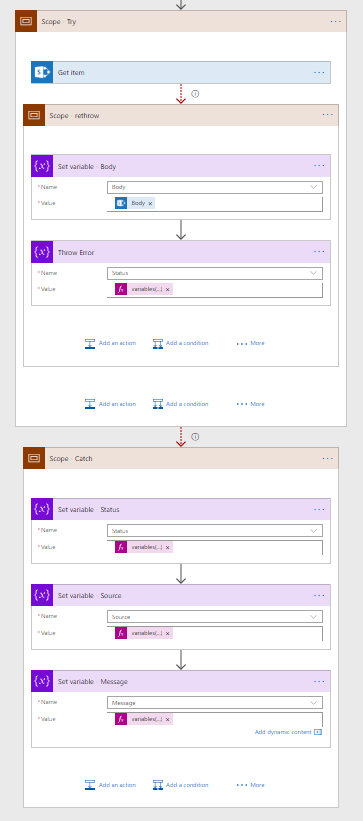
And now all I need to repeat is the Throw scope wherever I want to handle an error.
Pieter Veenstra

Is your business still running on paper trails, sprawling Excel files, or ageing Access databases? There's a better way — and I can show you exactly what it looks like. I'm the Technical Director of Vantage 365, a Microsoft solutions consultancy working with clients across the UK, the Netherlands, and worldwide. For over 30 years I've been turning messy, manual business processes into clean, automated systems that save time, reduce errors, and give teams the visibility they need to make better decisions. SharePains is not just any blog run by a Microsoft MVP. Have you ever used Try-Catch in Power Automate? The original post about Try-Catch in Power Automate can still be found on this site, https://sharepains.com/2018/02/07/try-catch-finally-in-power-automate-flow/ Or have you ever used the Pieter’s method to avoid variables and speed up your flows? https://sharepains.com/2020/03/11/pieters-method-for-advanced-in-flows/ You can contact me using contact@sharepains.com


this is a good post. however, I would like to group all my actions under one Scope – Try. If anything fails within that scope, how do I get the error message? In your example, you can get error by body(‘Get_Item’)?[‘Message’], but when you have multiple actions, how do you know which one failed?
You might want to have a look at the function library series that I wrote recently.
This includes a section about detailed error handling covering the problem you mentioned. Unfortunately there isn’t an errors function giving all errors during a flow.
https://veenstra.me.uk/2019/09/12/error-handling-with-function-libraries-in-microsoft-flow/