
Recently Microsoft introduced Attention Views in the modern SharePoint look and feel.
Introduction to Attention Views
If you don’t know what Attention views are please have a look at Tracy van der Schyff’s post on Attention views. In this post I’m looking at the importance of check in and checkout of documents in relation to attention views.
In my case I’ve got a document library and I’m uploading documents by using drag and drop. All good and easy.

You might however have noticed that documents are checked in even though required fields are not filled in. Is this right? You will even find that, as documents are checked in, your flows that are triggered by documents in this library will kick off.
If you don’t want flows to run without the required fields being completed, within Microsoft Flow you will need to check if your required fields have been filled in or not.
Today I had a more traditional user that doesn’t like the new stuff offered by the modern look and feel. therefore he switch back to classic using the Return to classic SharePoint link
Again the same thing. He dragged a document into the library and the document remained checked out. When looking at the document in the modern look and feel the document was indeed checked out and flows were not triggered as they were owned by a service account.
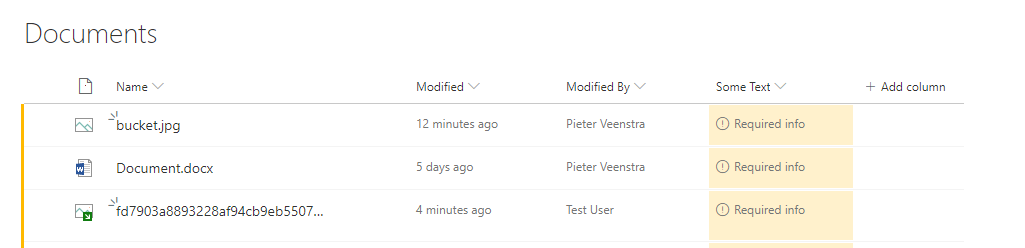
If you now upload a document as the flow owner you will find that the flow does indeed trigger making it very confusing when you test your flows as you get different behaviour between users and flow owners when using classic library views.
My question now is should documents be checked in the modern look and feel when not all required field have been completed? What does required mean? Document check in/out has suddenly become a bit less obvious.
[polldaddy poll=10125886]
Pieter Veenstra

Is your business still running on paper trails, sprawling Excel files, or ageing Access databases? There's a better way — and I can show you exactly what it looks like. I'm the Technical Director of Vantage 365, a Microsoft solutions consultancy working with clients across the UK, the Netherlands, and worldwide. For over 30 years I've been turning messy, manual business processes into clean, automated systems that save time, reduce errors, and give teams the visibility they need to make better decisions. SharePains is not just any blog run by a Microsoft MVP. Have you ever used Try-Catch in Power Automate? The original post about Try-Catch in Power Automate can still be found on this site, https://sharepains.com/2018/02/07/try-catch-finally-in-power-automate-flow/ Or have you ever used the Pieter’s method to avoid variables and speed up your flows? https://sharepains.com/2020/03/11/pieters-method-for-advanced-in-flows/ You can contact me using contact@sharepains.com

