
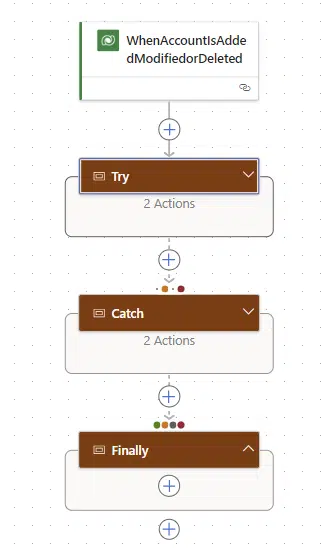
Today suddenly my flow does not trigger anymore. My flow should trigger when a new account is created but suddenly it doesn’t trigger my flow anymore.
First steps to debug the issue
First of all I tried to rerun a previous flow run. This flow still ran without any issue.

Then I clicked on the All runs to get to the Full Run history. Then within the Failed checks view I’m hoping to find a clue.
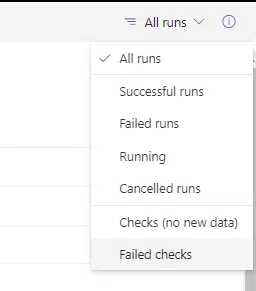
In the failed checks view I can see the flow that failed to trigger:

And in the flow run details for this flow that failed to trigger, I got another clue.

What does this mean:
Entity ‘callbackregistration’ With Id = 5f079dee-9d84-ee11-8179-002248b1fb30 Does Not Exist
Well something does not exist.
Fixing the flow when a flow does not trigger anymore

So how do we go about fixing these flows that fail to trigger?
First step is to switch off the flow using the Turn Off option in the menu.
Then after that Turn the flow back On.
And that is it!
So what causes these kind of issues?
Understanding Power Automate flow schemas
When you run a flow there are a number of elements important to run a flow.
- Connections (You can’t run actions without connections being valid!)
- Input Parameters
- Output Parameters
If any of the above change then you will find that testing a flow from a previous run will not work. But also if any of the above change in a child flow the parent flow will report issues. Restarting (Turn Off followed by Turn On) the parent flow may give you some error messages while you try to save the flow.
In our case we didn’t have input or output parameters in our flow. But we did have child flows that had their schema changed as some additional output parameters were added.
Regularly restarting your flows (in development only!) might be a good idea. So that you are at least aware of the issue before users report failures of the system.
Pieter Veenstra

Is your business still running on paper trails, sprawling Excel files, or ageing Access databases? There's a better way — and I can show you exactly what it looks like. I'm the Technical Director of Vantage 365, a Microsoft solutions consultancy working with clients across the UK, the Netherlands, and worldwide. For over 30 years I've been turning messy, manual business processes into clean, automated systems that save time, reduce errors, and give teams the visibility they need to make better decisions. SharePains is not just any blog run by a Microsoft MVP. Have you ever used Try-Catch in Power Automate? The original post about Try-Catch in Power Automate can still be found on this site, https://sharepains.com/2018/02/07/try-catch-finally-in-power-automate-flow/ Or have you ever used the Pieter’s method to avoid variables and speed up your flows? https://sharepains.com/2020/03/11/pieters-method-for-advanced-in-flows/ You can contact me using contact@sharepains.com