

It could happen to any of us. We delete a flow in Power Automate and then there is this oops moment. How do I restore deleted flows?
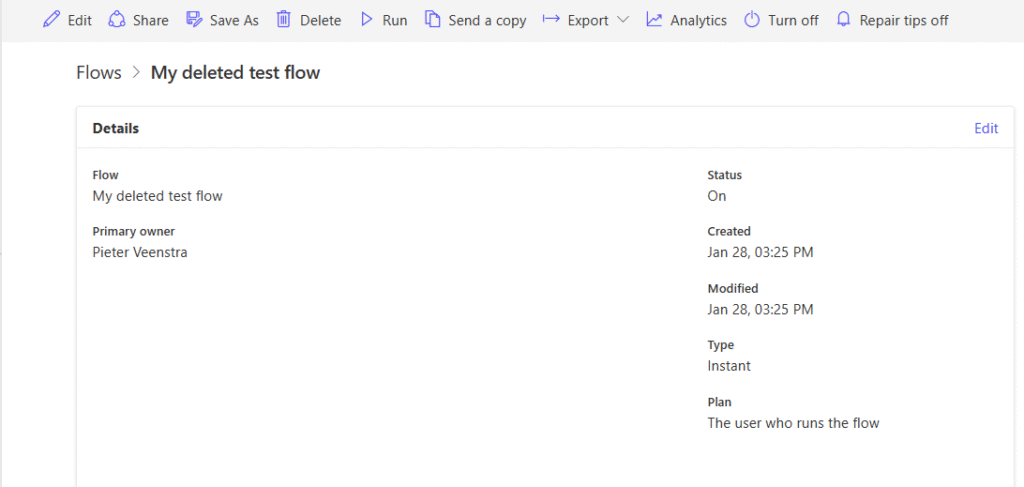
Restore Deleted flow as Admin
Within the Power Automate for Admins connector there is an actions called Restore Deleted flow as Admin action. This action lets you restore flows that you have deleted. Now one of the annoying details is that you have only 5 flows to select.
The flow that I want to restore is not listed unfortunately. Further down this post I will look at how to make sure that your flow is listed.
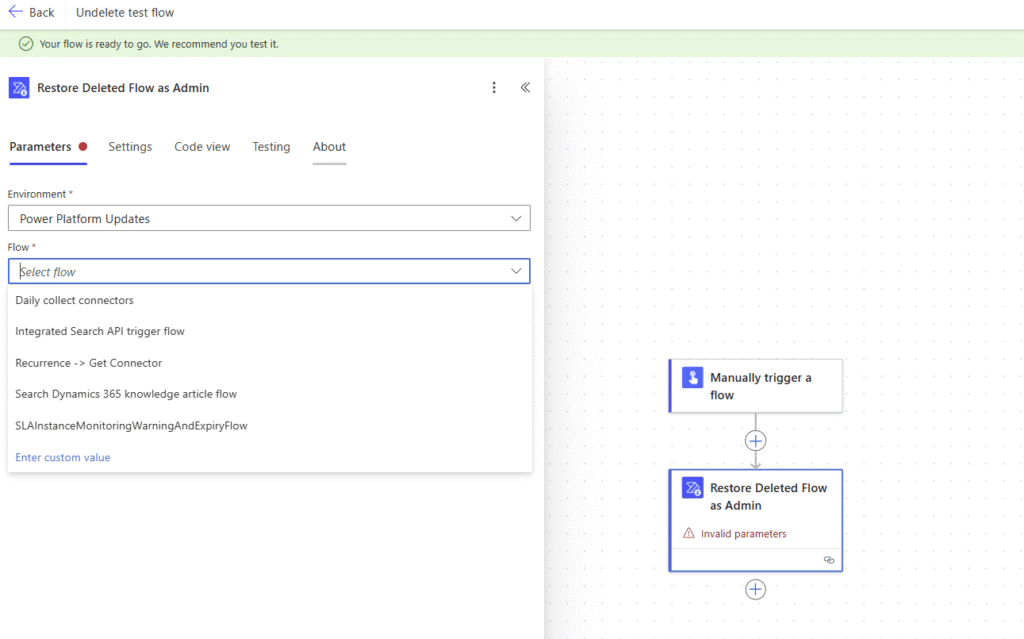
This is a bit of a pain.
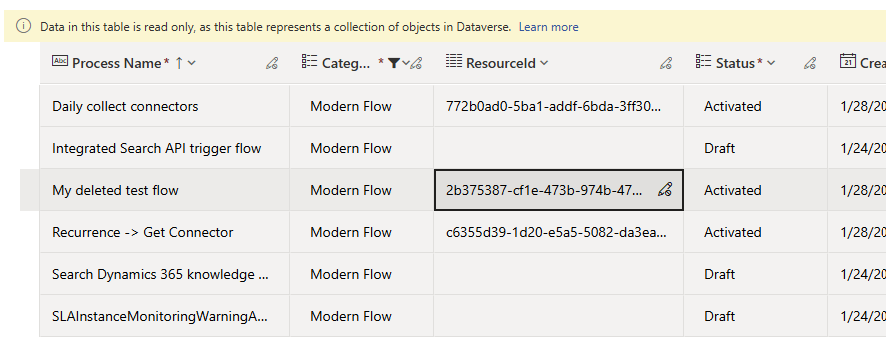
Now after a bit of testing I found that the GUID of the deleted flow could be used to make the Restore Deleted Flow as Admin action work.

Now I’ve got the GUID of the flow available but what if I haven’t got the Guid available? It is quite likely that you would have the GUID of every flow that you may accidentally delete. What do I do?
Get the flow GUID
Now, if you find that you haven’t got that GUID. There may be some ways of getting that GUID back. But there are better ways to go about this.
Restore deleted flows
Now depending on how you created your flow, your flow will be listed in that dropdown or not.

When you create a flow you should of course always add the flow to solutions. The above dropdown is fed by the Process table in Dataverse and all modern flows are listed. Now either the flow can be selected from the dropdown or the ResourceId can be found in the Process table.
Get Power Automate to find the flow name
First we add a List Flow as Admin step to our flow. This will now give us a list of flows that we could restore.

Now we just add a condition and select the flow by using the name of the flow that we want to restore.

Then finally we update the Restore Deleted Flow action to include the Flow Name. This can be selected from the Dynamic content.

So in this post some ways of restoring you deleted flow. More Power Automate tips can be found in my Power Automate User Guide
Pieter Veenstra

Is your business still running on paper trails, sprawling Excel files, or ageing Access databases? There's a better way — and I can show you exactly what it looks like. I'm the Technical Director of Vantage 365, a Microsoft solutions consultancy working with clients across the UK, the Netherlands, and worldwide. For over 30 years I've been turning messy, manual business processes into clean, automated systems that save time, reduce errors, and give teams the visibility they need to make better decisions. SharePains is not just any blog run by a Microsoft MVP. Have you ever used Try-Catch in Power Automate? The original post about Try-Catch in Power Automate can still be found on this site, https://sharepains.com/2018/02/07/try-catch-finally-in-power-automate-flow/ Or have you ever used the Pieter’s method to avoid variables and speed up your flows? https://sharepains.com/2020/03/11/pieters-method-for-advanced-in-flows/ You can contact me using contact@sharepains.com

Thank you ! This is very helpful.