

What can be easier than the OnChange event in Power Apps? When a user selects or types a new value for a control we can configure our app to do something. But what if that OnChange event triggers at the wrong time?
Power Apps OnChange events
Now when we configure the OnChange event of a TextInput control as shown below.

We will find that when we type some information in the text input box, the notification will appear.
This is all as expected. There are however some
OnChange in Galleries
When we move our input box into gallery. The gallery has a dynamic data source as a sequence of number is generated. When we update the sequence the Notifications from the OnChange are not being triggered.
In my little example app, I’m setting the length of the an array of numbers and then by pressing the button my gallery is set to the following sequence:
Sequence(varNumberOfRecords,1,1)So when a user updates a value the OnChange is triggered while this event doesn’t trigger when we programmatically set the source of the data in the gallery. Now this is all documented behaviour.
Programmatically set the Combobox Value
Now that we have looked at the OnChange behaviour and understand how onChange should work.
I’ve created an app with a gallery, a Combobox and a button. The button sets a variable, varCount. This variable counts the number of items in my gallery and increases it by one.
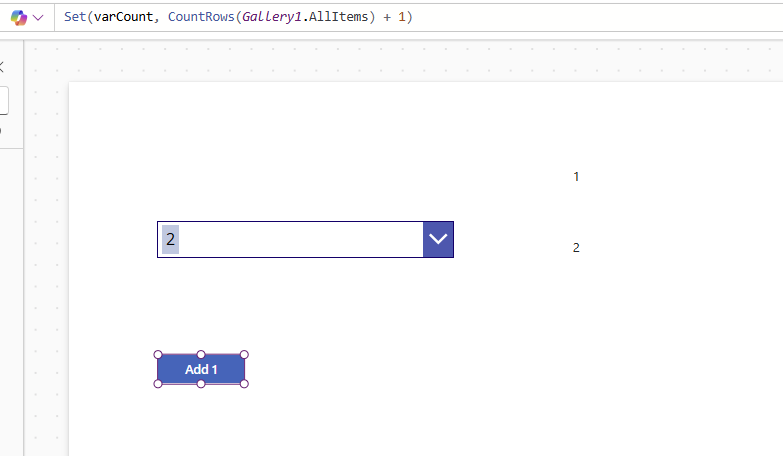
Then my Combobox updates its source of data to the sequence of numbers up to the varCount.
Now when we press the button, the combo box is being updated and I found that the OnChange of the Combo box event is triggered. Even though there is no user actually updating the combo box as a Notification inside my Combo box’s OnChange is shown when the DefaultSelectedItem property is updated.

Time to look at the Microsoft documentation. How should this all work?
OnChange – Actions to perform when the user changes the value of a control (for example, by adjusting a slider).
So only users can trigger an onChange event according to the documentation! And looking at the Combo box documentation, it is even clearer:

Yes, my setup here is a techy. However I came across this issue within a business app for one of my clients where a lot of Combo boxes were used within their app.
So how do we work around this issue?
Well that is a tricky question.
Handling OnChange issues in Combo boxes
In my case the app was reading data from a data source, which then updated the controls in my app.
So for all the combo boxes in my app, I included a check to compare the control’s current value with the value of the data in the database. When they match then simply, ignore the onChange event.
FAQs
How does the onChange in Power Apps work for Controls?
Whenever the data in a control is updated by a user the Control will trigger the code in the OnChange property.
How to handle OnChange issues with Combo boxes in Power Apps
In the onChange Code check if the value of the Combo box matches your datasource. If they don’t match then run the OnChange code and otherwise exclude this code using an If function.
What does OnChange do in Power Apps?
OnChange events trigger code within the app. When a use enters data or selects a value from a dropdown then the OnChange event could be triggering code that saves the entered data into the data records.
What is the difference between Onchange and OnSelect in Power Apps?
OnChange triggers when data is changed, where OnSelect run when a control selected or clicked on
Pieter Veenstra

Is your business still running on paper trails, sprawling Excel files, or ageing Access databases? There's a better way — and I can show you exactly what it looks like. I'm the Technical Director of Vantage 365, a Microsoft solutions consultancy working with clients across the UK, the Netherlands, and worldwide. For over 30 years I've been turning messy, manual business processes into clean, automated systems that save time, reduce errors, and give teams the visibility they need to make better decisions. SharePains is not just any blog run by a Microsoft MVP. Have you ever used Try-Catch in Power Automate? The original post about Try-Catch in Power Automate can still be found on this site, https://sharepains.com/2018/02/07/try-catch-finally-in-power-automate-flow/ Or have you ever used the Pieter’s method to avoid variables and speed up your flows? https://sharepains.com/2020/03/11/pieters-method-for-advanced-in-flows/ You can contact me using contact@sharepains.com


I had a similar issue to this and found that drop-downs don’t trigger the onchange when updating their source data from the gallery items like comboboxes and went that route after several hours of troubleshooting since search wasn’t a requirement. Thanks for shedding light on this workaround!