
You might want to Enable the new Power Automate pane feature when you add a flow to your app and you have to find the right flow in a long list of flows.
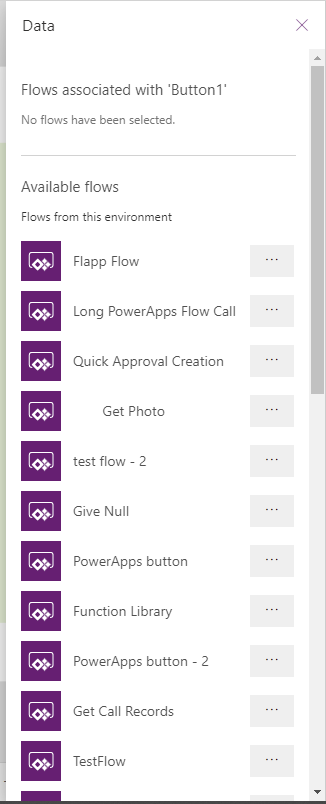
Enable Power Automate pane preview feature
It can be a real pain to get the right flow in that long list. But not when you enable the new Power automate pane feature.
All you need to do is enable the Enable Power Automate pane and restart your app

And now there is an additional option available in Power Apps.
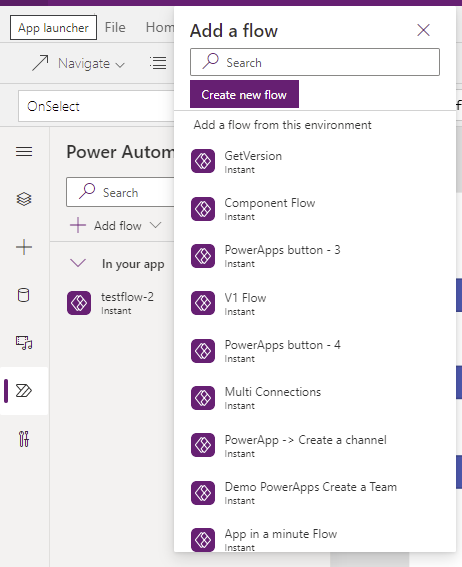
You can now add flows and search for flows and assign the flow to for example a button within no time at all.
But that is not all.
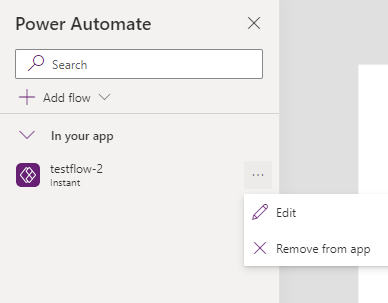
There is also an easy option to remove the flow from your app in the same pane.
This is one of those preview features that should really be enabled by default as it has been missing for such a long time.
Discover more from SharePains
Subscribe to get the latest posts sent to your email.
Pieter Veenstra

Is your business still running on paper trails, sprawling Excel files, or ageing Access databases? There's a better way — and I can show you exactly what it looks like. I'm the Technical Director of Vantage 365, a Microsoft solutions consultancy working with clients across the UK, the Netherlands, and worldwide. For over 30 years I've been turning messy, manual business processes into clean, automated systems that save time, reduce errors, and give teams the visibility they need to make better decisions. SharePains is not just any blog run by a Microsoft MVP. Have you ever used Try-Catch in Power Automate? The original post about Try-Catch in Power Automate can still be found on this site, https://sharepains.com/2018/02/07/try-catch-finally-in-power-automate-flow/ Or have you ever used the Pieter’s method to avoid variables and speed up your flows? https://sharepains.com/2020/03/11/pieters-method-for-advanced-in-flows/ You can contact me using contact@sharepains.com
Hi Pieter, Thank you for this article.
Could you help please? I can see that add Power Automate to a button in Component Library disappeared, do you know how to return it back?