Using the latest version of PnP PowerShell some new Cmdlets have been introduced.
I’m going to have a look at some of these new commands in this post that help you manage Office 365 groups.
Connecting to Microsoft Graph
First to setup a connection to Microsoft Graph the Cmdlet Connect-PnPMicrosoftGraph has been created.
Connect-PnPMicrosoftGraph -Scopes “Group.ReadWrite.All”
Within this command the permission scope(s) need to be supplied.DEpnding on what you want to do you will need certain permissions. In my case I’m going to take ReadWrite permissions.
After a login window where I’m logging in with my MSDN account I’m now getting a dialog asking me to confirm the required permissions:
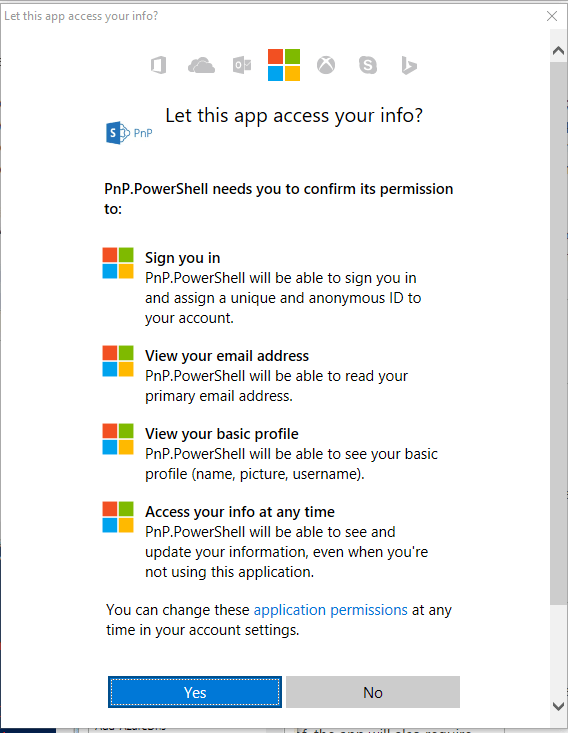
Once I click on Yes. The connection has been made.
Now I’m going to see if I can get to my groups using Get-PnPUnifiedGroup
[code lang=text]
Get-PnPUnifiedGroup -Identity “PnP”
[/code]

Ah ok, So I first need to get my access token with the following command
[code lang=text]
$token = Get-PnPAccessToken
So I’ve now got 3 lines of PowerShell
<blockquote>Connect-PnPMicrosoftGraph -Scopes “Group.ReadWrite.All”
$token = Get-PnPAccessToken
Get-PnPUnifiedGroup -Identity “PnP”
[/code]
Get-PnPAccessToken seems to be giving a warning.
WARNING: The Azure AD OAuth 2.0 Access Token has expired. Authenticate again using
the Connect-PnPMicrosoftGraph cmdlet.
And the Get-PnPUnifiedGroup gives another variation of issues.
Get-PnPUnifiedGroup : No Azure AD connection, please connect first with
Connect-PnPMicrosoftGraph
At C:\Users\pveenstra\Downloads\graph.ps1:6 char:1
+ Get-PnPUnifiedGroup -Identity “PnP”
+ ~~~~~~~~~~~~~~~~~~~~~~~~~~~~~~~~~~~
+ CategoryInfo : NotSpecified: (:) [Get-PnPUnifiedGroup], InvalidOpe
rationException
+ FullyQualifiedErrorId : System.InvalidOperationException,SharePointPnP.Powe
rShell.Commands.Graph.GetUnifiedGroup
Get-PnPUnifiedGroup : Exception of type ‘Microsoft.Graph.ServiceException’ was
thrown.
At C:\Users\pveenstra\Downloads\graph.ps1:6 char:1
+ Get-PnPUnifiedGroup -Identity “PnP”
+ ~~~~~~~~~~~~~~~~~~~~~~~~~~~~~~~~~~~
+ CategoryInfo : NotSpecified: (:) [Get-PnPUnifiedGroup], ServiceExc
eption
+ FullyQualifiedErrorId : Microsoft.Graph.ServiceException,SharePointPnP.Powe
rShell.Commands.Graph.GetUnifiedGroup
Ok, so the connection isn’t setup correctly.
Now I’m trying to use my corporate Triad account (Both accounts have admin rights wherever possibly needed) so there shouldn’t be a difference. However when I run with my company account I’m suddenly getting my groups back.

Creating new groups
Now finally I’ll look at creating new groups. With the New-PnPUnifiedGroup I can create new groups.
New-PnPUnifiedGroup -DisplayName “My Test Group” -Description “This is my group” -MailNickname “Testgroup” -Owners “pieter.veenstra@…”
For more information on the permissions requests see Permission scopes | Graph API concepts
Pieter Veenstra

Is your business still running on paper trails, sprawling Excel files, or ageing Access databases? There's a better way — and I can show you exactly what it looks like. I'm the Technical Director of Vantage 365, a Microsoft solutions consultancy working with clients across the UK, the Netherlands, and worldwide. For over 30 years I've been turning messy, manual business processes into clean, automated systems that save time, reduce errors, and give teams the visibility they need to make better decisions. SharePains is not just any blog run by a Microsoft MVP. Have you ever used Try-Catch in Power Automate? The original post about Try-Catch in Power Automate can still be found on this site, https://sharepains.com/2018/02/07/try-catch-finally-in-power-automate-flow/ Or have you ever used the Pieter’s method to avoid variables and speed up your flows? https://sharepains.com/2020/03/11/pieters-method-for-advanced-in-flows/ You can contact me using contact@sharepains.com