
For one of my customers I enabled content approval on a list. This should all be quite easy. I simply went to the Versioning settings of the list and I found the right options.
In this case my customer wanted all the items to be visible to everybody even if the items aren’t approved yet.
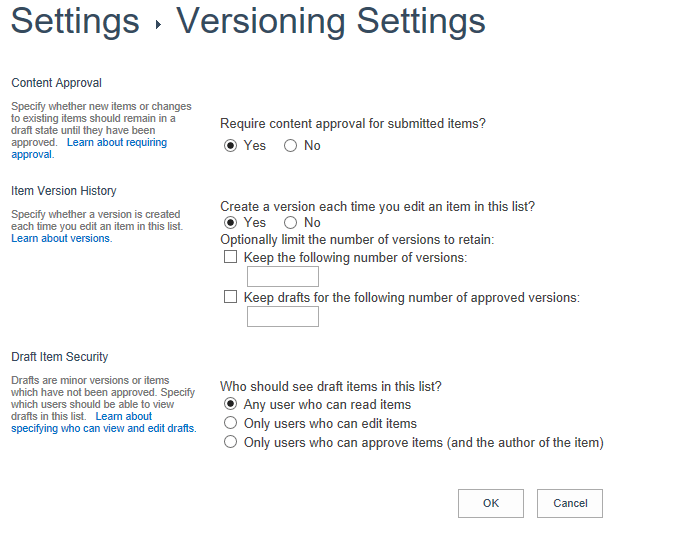 So there is even an option for this as I found the Any user who can read items can be selected in the Who should see draft items in this list? option.
All easy isn’t it?
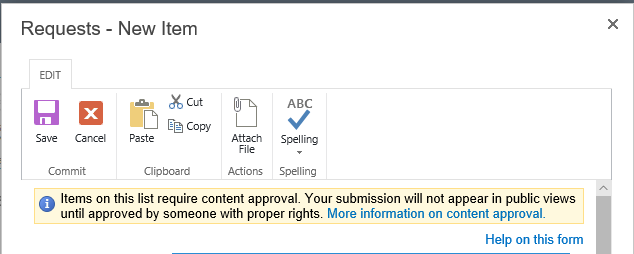
Now the strange thing that happened. When I now create new items I’m getting a warning
Items on this list require content approval. Your submission will not appear in public views until approved by someone with proper rights.
 Huh?
Huh?
It looks like this warning always appears when content approval is turned on even if the option to make this available to all readers. Something doesn’t seem to be right here! I could of course look into hiding the information bar, however that would also remove all other warnings that may appear on the new item form.
Pieter Veenstra

Is your business still running on paper trails, sprawling Excel files, or ageing Access databases? There's a better way — and I can show you exactly what it looks like. I'm the Technical Director of Vantage 365, a Microsoft solutions consultancy working with clients across the UK, the Netherlands, and worldwide. For over 30 years I've been turning messy, manual business processes into clean, automated systems that save time, reduce errors, and give teams the visibility they need to make better decisions. SharePains is not just any blog run by a Microsoft MVP. Have you ever used Try-Catch in Power Automate? The original post about Try-Catch in Power Automate can still be found on this site, https://sharepains.com/2018/02/07/try-catch-finally-in-power-automate-flow/ Or have you ever used the Pieter’s method to avoid variables and speed up your flows? https://sharepains.com/2020/03/11/pieters-method-for-advanced-in-flows/ You can contact me using contact@sharepains.com


Can’t you refer a custom js to hide this message based on the content ? some jQuery tricks !
Hi Larry, I could do that, however if I then at a later moment change the the content approval settings then I might find that the message will not appear when it should. By the way, I noticed that in the modern list experience the warning doesn’t appear with my list settings.