
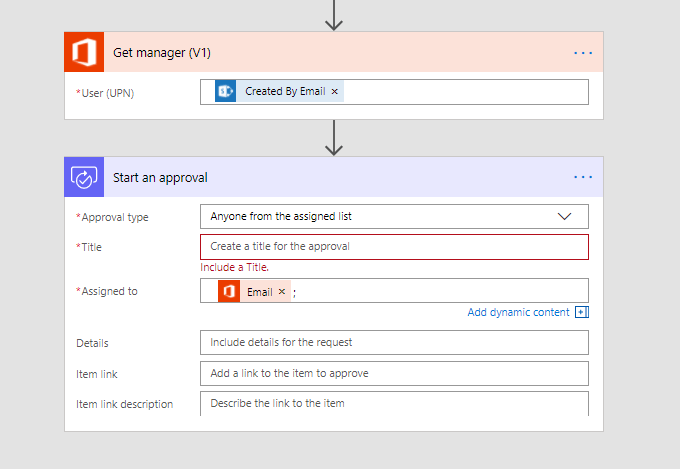
Today, a very quick post about Microsoft Flow. You want to get the manager of the user that created a document to approve a document. You don’t want to specify who the manager is within the flow. Instead Flow should find the manager.
The Get Manager action can help you here:
Pieter Veenstra

Is your business still running on paper trails, sprawling Excel files, or ageing Access databases? There's a better way — and I can show you exactly what it looks like. I'm the Technical Director of Vantage 365, a Microsoft solutions consultancy working with clients across the UK, the Netherlands, and worldwide. For over 30 years I've been turning messy, manual business processes into clean, automated systems that save time, reduce errors, and give teams the visibility they need to make better decisions. SharePains is not just any blog run by a Microsoft MVP. Have you ever used Try-Catch in Power Automate? The original post about Try-Catch in Power Automate can still be found on this site, https://sharepains.com/2018/02/07/try-catch-finally-in-power-automate-flow/ Or have you ever used the Pieter’s method to avoid variables and speed up your flows? https://sharepains.com/2020/03/11/pieters-method-for-advanced-in-flows/ You can contact me using contact@sharepains.com


What will happen if a use that starts the flow does not have a manager identified in their profile?
Hi Dean, Then you will get an error. But that is something you could handle in your flow.
Why, but why did Microsoft re develop things that existed before? And not upgrading existing possibilites? Workflow 2010 had the same functionality; that disappeared from Workflow 2013 (why?). And now Flow is going to look like workflows, and it was not intended to be (for me Flow was to automate actions, not creating workflows…)
Hi, i wouldn’t just see flow as a direct replacement for SPD, it is many times better and more flexible. Yes some if the actions available before might not be there, but you can do it all and a lot more without too much effort. Flow isn’t just for automating some small steps. It is both for small and large flows. It simply gives you a no code automation tool.