

Have you ever wanted to send push notification to people’s phones to run a Power App?
What do you need?
The aim is to send a push notification to user’s Power Apps application so that they can open an application on their devices.
All that is needed is having the Power Apps application installed and the user will need to be logged in with the account that you send the notification to.
Alternatively you can also use the Field Service app (Dynamics 365) installed, to get a similar experience. In this post I will use the mobile Power Apps app
My app
I started by creating an example app. this app could be any app and it really doesn’t matter what you app look like.

A flow to send the push notification
Now I’ve created a flow in Power Automate to send a push notification to Power Apps using the all new Send push notification V2 action.

Comparing the new version to the old version it is quite easy to see the improvements made.
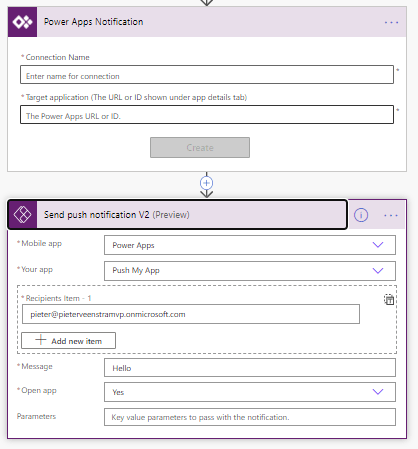
Also note the parameters that you can use to send to the app.
How Push notifications work
A user will get a message as shown below. In my case I only send the Hello message but you could of course send a more useful message there.

And when the user taps on the message the the application will be loaded and the user got to the right app without you have to send them a link.

Sending push notifications to the right app from a flow can be very powerful. I can see many use cases for this! Can you?
Just imagine pointing all your staff to the new holiday booking app. They would love this so much that you would never see them again!
Pieter Veenstra

Is your business still running on paper trails, sprawling Excel files, or ageing Access databases? There's a better way — and I can show you exactly what it looks like. I'm the Technical Director of Vantage 365, a Microsoft solutions consultancy working with clients across the UK, the Netherlands, and worldwide. For over 30 years I've been turning messy, manual business processes into clean, automated systems that save time, reduce errors, and give teams the visibility they need to make better decisions. SharePains is not just any blog run by a Microsoft MVP. Have you ever used Try-Catch in Power Automate? The original post about Try-Catch in Power Automate can still be found on this site, https://sharepains.com/2018/02/07/try-catch-finally-in-power-automate-flow/ Or have you ever used the Pieter’s method to avoid variables and speed up your flows? https://sharepains.com/2020/03/11/pieters-method-for-advanced-in-flows/ You can contact me using contact@sharepains.com


awesome share Pieter as always
Thanks
Thanks Pieter. Assuming there is a requirement for the user receiving the push to have the Power Apps app installed in the first place and therefore notifications wouldn’t go to users that are purely using Power Apps via desktop?
While we aren’t using field services yet, I am excited by the potential use in that area.
With these flows I am assuming we can write some nice trigger conditions to fire when an item is due or overdue for completion as well. ?
Hi Sam, of course this can be built into any flow. Imagine for example an approval flow which then sends a push to a user.
Anything is possible it is only people’s imagination and knowledge that stops the possibilities being implemented.