After last week’s post about how to configure Azure Synapse Link to export data from Dataverse into SQL Server, today a post about some issues. How do you deal with the failed to load messages that users might get when accessing the data.

Failed to load
When users try to access the data, they may get the failed to load message. The supporting details of the error may say something like Failed to load one or more resources due to no access, error code 403.
How do we go about troubleshooting this issue?
The error message when clicking on the details will also include that there is something wrong with accessing any of the following:
- Pipeline
- Dataset
- Linked service
- Trigger
- Data flow
- SQL script
- Spark job definition
- Credential
- Synapse KQL scripts
- Lake databases
- Apache Spark configuration
As I placed all the objects into a resource group, I checked the resource group permissions to include my user(s) that need to access the data.
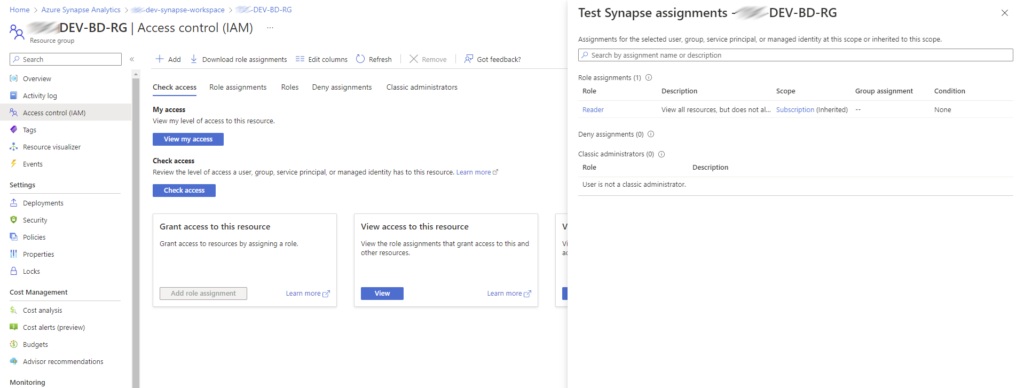
I also checked what happened when I just click on ok, on the error message and compared this with when I access the workspace with my admin account. And quite quickly it is clear that I don’t have access to the databases.

So how do we give access to users accounts to the data?
Configure Access Control
First of all go to your Azure Synapse workspace, and then open the Synapse Studio

Then Find the Manage option and select Access Control.

This is where you can add other users and give them the roles that they need. Once you have given them access they can access the data.

Pieter Veenstra

Is your business still running on paper trails, sprawling Excel files, or ageing Access databases? There's a better way — and I can show you exactly what it looks like. I'm the Technical Director of Vantage 365, a Microsoft solutions consultancy working with clients across the UK, the Netherlands, and worldwide. For over 30 years I've been turning messy, manual business processes into clean, automated systems that save time, reduce errors, and give teams the visibility they need to make better decisions. SharePains is not just any blog run by a Microsoft MVP. Have you ever used Try-Catch in Power Automate? The original post about Try-Catch in Power Automate can still be found on this site, https://sharepains.com/2018/02/07/try-catch-finally-in-power-automate-flow/ Or have you ever used the Pieter’s method to avoid variables and speed up your flows? https://sharepains.com/2020/03/11/pieters-method-for-advanced-in-flows/ You can contact me using contact@sharepains.com