

Recently I have done a lot of work with SQL Stored Procedures in Power Apps. But what do you do if you want to have some fields encrypted in your SQL database? In this post how to Encrypt and decrypt using stored procedures.
Encrypt a column using Stored procedures
So first of all I created a Symmetric key called MY_KEY in my database. If you look under security you will find the place to create the this key.
Now adding that they Key is in place and I have a table with two columns, I_ID is my unique id of my record and the I_Description (I’m calling this I_Description so that it is easier to refer to the field in this post) is a field that will need to hold the data from my Rich Text field in Power Apps. The I_Description field as a VARBINARY(MAX) column.
Now my stored procedure to update a record will have two parameters. My @I_ID is an int whereas my @I_Description field is an NVARCHAR column.
ALTER PROCEDURE [dbo].[UpdateRecord]
	@I_ID [INT],
   	@I_Description = NVARCHAR(max) =NULL,
AS
BEGIN
END
This is the base of my stored procedure.
ENCRYPTBYKEY limitations
This is where the post really starts. The ENCRYPTBYKEY function in SQL has a limitation on the amount of content that it can generate. This limit is set to 8k characters/bytes. Now this limitation is really annoying.
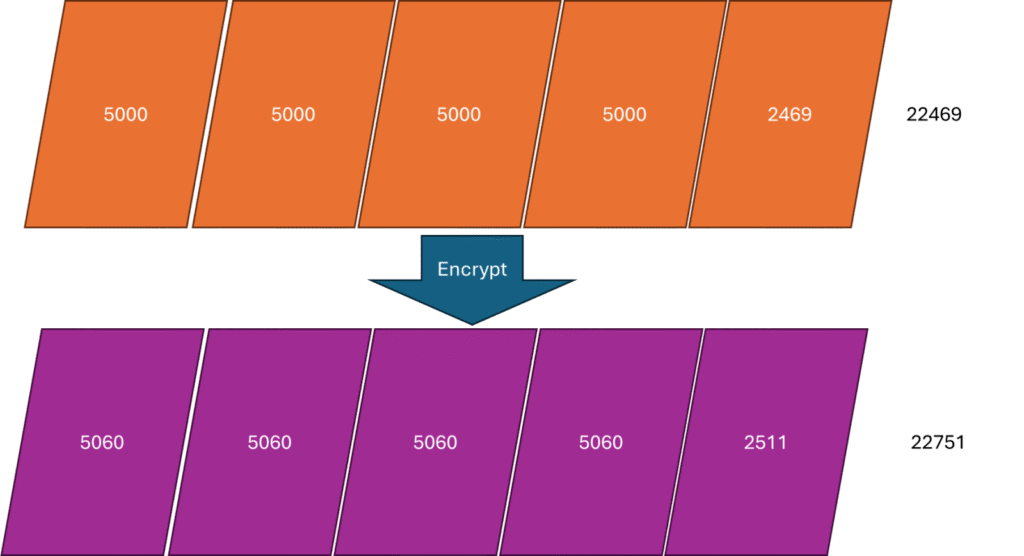
At first you might think that we can just encrypt the data in chunks of 8000 but that is not the case. The encryption will add some additional length to our data.
Now the size of the additional data will be the same (assuming that you don’t change anything in your encryption setup), but there isn’t an easy way to figure out what this increase is. In my case I compared the difference between my unencrypted chunks of data and my encrypted data.
When I used chunks of 5000 I ended up with encrypted chunks of 5060. Now this 5060 is important as I will need that during my decryption of the data. See the link to that post at the bottom of this post.
Declaring my variables
Within the BEGIN and END of my stored procedure so far I’m going to declare some variables.
DECLARE @eString VARBINARY(max),
	@TextLength BIGINT,
	@HandledLength BIGINT,
	@NextPart INT,
	@eChunk VARBINARY(8000),
@OldChunk VARBINARY(8000)- @eString is going to hold my data that I have encrypted.
- @TextLength will hold the length of my content. This is not encrypted text as stored by my Power App
- @HandledLength, this will keep track of my progress of the encryption
- @NextPart, The size of the next chunk
- @eChunk, the encrypted chunk of data
- @OldChunk, the chunk of data that is to be encrypted
Encrypting a Rich Text field
This is the complicated part of this post. After we declared our variables we will need to Open the symmetric key and we need to set some variables.
To open the key named MY_KEY we can use the following line of code.
OPEN SYMMETRIC KEY MY_KEY DECRYPTION BY CERTIFICATE CertRestriction; Then we need to set two variables. I’m using SELECT, but you could also use SET.
SELECT @HandledLength=1, @TextLength=DATALENGTH(@I_Description)The Handled Length is set to 1, this indicates that we start encrypting the data from the first character of the @I_Description parameter received by the stored procedure.
@TextLength looks is set to the length of the unencrypted source data.
Then we want to loop through the data to create the chunks of data. Within the loop we’re deciding the size of the next chunk of data. I’m setting this to 5000. We could potentially go closer to the 8000 however, we must ensure that the encrypted data doesn’t exceed the 8000 characters.
WHILE @HandledLength < @TextLength
BEGIN
   SET @NextPart = CASE WHEN @HandledLength+5000<@TextLength
  		        THEN 5000
			ELSE @TextLength-@HandledLength
		   END
   ...
   SET @HandledLength = @HandledLength + @NextPart
END
Reading chunks of data
Remember that our @I_Description is a NVARCHAR and the encryption functions want to use an VARBINARY data type. Therefore we will need to include a Convert to make sure that the SQL code is giving us VARBINARY.
SELECT @OldChunk = CONVERT(VARBINARY(8000), SUBSTRING(@I_Description, @HandledLength,@NextPart))The Above SUBSTRING function takes the first, second etc chunk of data.
So now the @OldChunk contains the unencrypted data. We can encrypt the data using the following line
SELECT @eChunk = ENCRYPTBYKEY(KEY_GUID('MY_KEY'), @OldChunk)This now gives us a single chunk of encrypted data. We will now collect each of the chunks and concatenate them together as we are encrypting each chunk.
SET @eString = CONVERT(VARBINARY(MAX),CONCAT(CONVERT(NVARCHAR(MAX),@eString), CONVERT(NVARCHAR(max),@eChunk)))In my case I’m wanting to put all chunks into a single database column. Potentially creating a separate table that holds the encrypted chunks could also be an alternative strategy.
Now that we have an eString variable we can do the update of our record.
Updating the record
	UPDATE ISSUE
	SET I_Description = @eString,
	WHERE I_ID = @I_ID
The full SQL script
Now if we put all of this together and add some error handling to the script. We have the following stored procedure in place.
SET ANSI_NULLS ON
GO
SET QUOTED_IDENTIFIER ON
GO
ALTER PROCEDURE [dbo].[UpdateRecord]
	@I_ID [int],
   	@I_Description = NVARCHAR(max) =NULL,
AS
BEGIN
	DECLARE @eString VARBINARY(max),
		@TextLength BIGINT,
		@HandledLength BIGINT,
		@NextPart INT,
		@eChunk VARBINARY(8000),
		@OldChunk VARBINARY(8000)

	BEGIN TRANSACTION;

	BEGIN TRY
	/*** Open sysmetric key to encrypt insert data ***/
	OPEN SYMMETRIC KEY ISSUE_KEY DECRYPTION BY CERTIFICATE CertRestriction;
	SELECT @HandledLength=1, @TextLength=DATALENGTH(@I_Description)
	WHILE @HandledLength < @TextLength
	BEGIN
		SET @NextPart = CASE WHEN @HandledLength+5000<@TextLength
				     THEN 5000
				     ELSE @TextLength-@HandledLength
				END

		SELECT @OldChunk = CONVERT(VARBINARY(8000), SUBSTRING(@I_Description, @HandledLength,@NextPart))
		SELECT @eChunk = ENCRYPTBYKEY(KEY_GUID('MY_KEY'), @OldChunk)

		SET  @eString = CONVDERT(VARBINARY(MAX),CONCAT(CONVERT(NVARCHAR(MAX),@eString), CONVERT(NVARCHAR(max),@eChunk)))

		SET @HandledLength = @HandledLength + @NextPart
	END

	UPDATE ISSUE
	SET I_Description = @eString,
	WHERE I_ID = @I_ID
   	COMMIT TRANSACTION;
END TRY
BEGIN CATCH
	ROLLBACK TRANSACTION;
	  -- Optionally, raise an error message
        DECLARE @ErrorMessage VARCHAR(4000);
        DECLARE @ErrorSeverity INT;
        DECLARE @ErrorState INT;

        SELECT
            @ErrorMessage = ERROR_MESSAGE(),
            @ErrorSeverity = ERROR_SEVERITY(),
            @ErrorState = ERROR_STATE();

        RAISERROR (@ErrorMessage, @ErrorSeverity, @ErrorState);
	END CATCH;
END
GO
Next steps – Decrypt data
The next post will follow soon.
Pieter Veenstra

Is your business still running on paper trails, sprawling Excel files, or ageing Access databases? There's a better way — and I can show you exactly what it looks like. I'm the Technical Director of Vantage 365, a Microsoft solutions consultancy working with clients across the UK, the Netherlands, and worldwide. For over 30 years I've been turning messy, manual business processes into clean, automated systems that save time, reduce errors, and give teams the visibility they need to make better decisions. SharePains is not just any blog run by a Microsoft MVP. Have you ever used Try-Catch in Power Automate? The original post about Try-Catch in Power Automate can still be found on this site, https://sharepains.com/2018/02/07/try-catch-finally-in-power-automate-flow/ Or have you ever used the Pieter’s method to avoid variables and speed up your flows? https://sharepains.com/2020/03/11/pieters-method-for-advanced-in-flows/ You can contact me using contact@sharepains.com

