

This is a typical post on a Friday afternoon, about weird date handling in Power Apps. But understanding this issue will help in many situations.
Dates in Power Apps
A couple of examples of using dates in Power Apps
Now()
"2024-12-31"   // huh this is not a date it is a text with a date or maybe not??
Formatting of dates in If statement
Now consider the following code in a label in Power Apps.
If( false,
    Now(),
    "2024-12-31"
)
What will this return?

A bit of a surprise here!
Why are the 00:00 added to my date?
If we format the true part of the If logic then get a different behaviour:
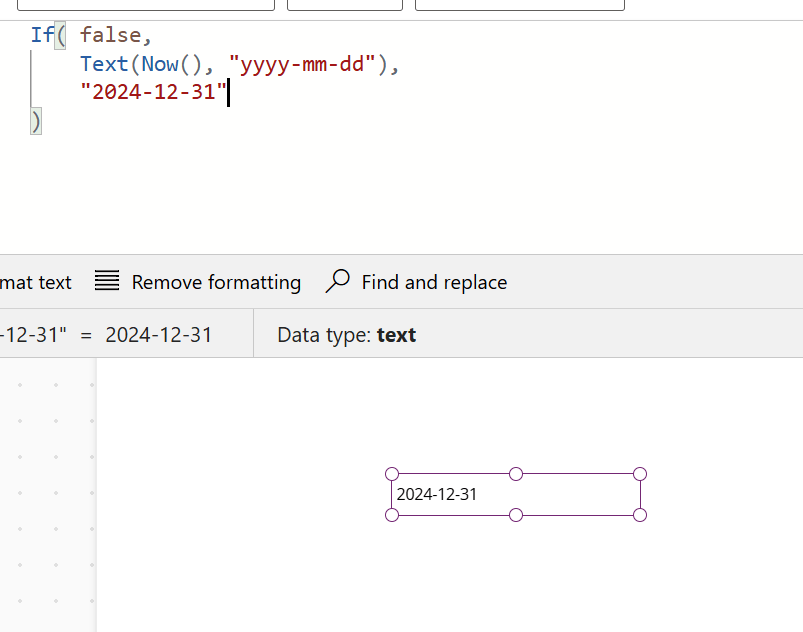
Now why is this?
Explanation of date issues
In the first example:
If( false,
    Now(),
    "2024-12-31"
)
Here the true branch sets the type of data to Date and Time, and then the false branch will auto convert to Date and Time.
In our second example the true branch is setting the output of the if to text and therefor the false branch will just return the given text.
I hope this helps someone else.
Pieter Veenstra

Is your business still running on paper trails, sprawling Excel files, or ageing Access databases? There's a better way — and I can show you exactly what it looks like. I'm the Technical Director of Vantage 365, a Microsoft solutions consultancy working with clients across the UK, the Netherlands, and worldwide. For over 30 years I've been turning messy, manual business processes into clean, automated systems that save time, reduce errors, and give teams the visibility they need to make better decisions. SharePains is not just any blog run by a Microsoft MVP. Have you ever used Try-Catch in Power Automate? The original post about Try-Catch in Power Automate can still be found on this site, https://sharepains.com/2018/02/07/try-catch-finally-in-power-automate-flow/ Or have you ever used the Pieter’s method to avoid variables and speed up your flows? https://sharepains.com/2020/03/11/pieters-method-for-advanced-in-flows/ You can contact me using contact@sharepains.com


Hi Pieter
It’s funny you mention weird datetime behaviour, cause I have this code that has been working for a long time and all of a sudden, it failed. The code just takes the date and time Now(), replaces minutes and seconds with 00:00, so the start of the hour and an other one does the same and add one hour and stores it into a table.
Here’s the code:
Set(TimeNow, DateTimeValue($”{Text(First(Split(Text(Now(),DateTimeZone.UTC),”:”)).Value)}:00:00.00Z”));
Set(TimeOneHour, DateTimeValue($”{Text(First(Split(Text(DateAdd(Now(),1,TimeUnit.Hours),DateTimeZone.UTC),”:”)).Value)}:00:00.00Z”));
Set(varTimeRegItem, Patch(‘Time Registrations’,Defaults(‘Time Registrations’),{Task:ThisItem},{‘Invoice description’:ThisItem.Subject},{‘Start time’:TimeNow},{‘End time’:TimeOneHour},{‘Worked Hours’:1.0},{‘Invoice hours’:1.0}));
It can problably be done in a smarter way:)
The weird part is that it stopped working one Tuesday telling me that “2024-11-26T17:00:00.00Z” was not a valid date. I tried everything, gave up and the next day it worked again…
My guess is that some current MS update to our environment temporarily messed up the date time format and made an update and then it worked again.
But yes, for sure, date time handling can be weird
Hi Jesper,
Rather than concatenating the time to the date I would use formatstrings instead.
Then for the Patch function it looks like you are updating each field as a separate object. I would do that as a single object merging the Invoice description , Start time, End time, Worked Hours and Invoice hours. That would simplify the code quite a bit.