
One of the known challenges in Power Automate is to calculate next month’s date. When you use the DateTime connector quite often flow gives you a date that is roughly right. In this post I’m giving a number of steps that can calculate next month’s date.
Get the current time
I’m starting with a Compose step to get the current date and time with the utcNow function. This step of course isn’t really needed. But it makes it easier to explain the solution.

Set the time zone
Then in my second step I will convert the flow to the GMT time zone. The GMT zone is my local time zone. So you might have to chnage this to your local time zone.
convertFromUtc(outputs('Compose_-_Current_Date_and_Time'),'GMT Standard Time','yyyy-MM-ddTHH:mmZ')Then I’ll calculate the current day of the month. In this I use the format date time string of ‘dd’ to get the day.
convertFromUtc(utcNow(),'GMT Standard Time','dd')
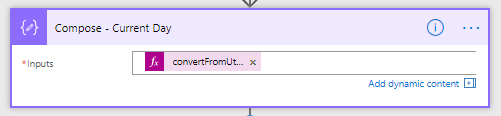
Then I’ll add a month to my utcTime that I collected earlier.
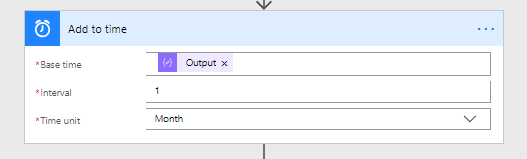
Rather than using the above easy to use broken action you could also use the following function:
addToTime(outputs('Compose_-_Current_Date_and_Time'),1,'Month','yyyy-MM-ddTHH:mmZ')and finally I replace the wrong day with the correct day.

replace(body('add_to_time'),substring(body('add_to_time'),7,4),concat('-',outputs('Compose_-_Current_Day'),'T'))
Note: Rather than using outputs in the above you could also simply use:
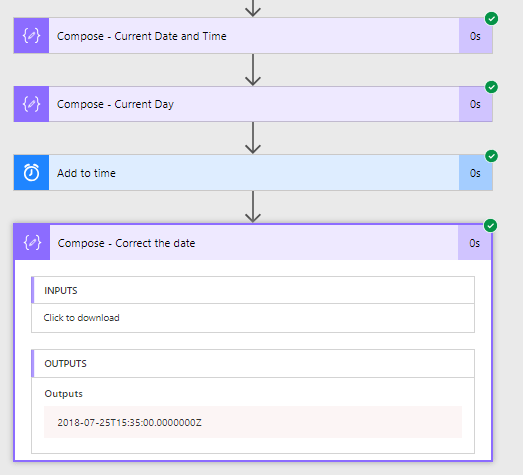
replace(body('add_to_time'),substring(body('add_to_time'),7,4),concat('-',convertFromUtc(utcNow(),'GMT Standard Time','dd'),'T'))Now I’ve got the following flow that calculates next month.

After I’ve optimized my flow a bit by removing the first Compose I’m now ( at 2018-07-21 15:35 ) getting my next month’s date.
Calculate Next month in one step
And we could even take this further and use just 1 Compose:
replace(
addToTime(
convertFromUtc(utcNow(),'GMT Standard Time','yyyy-MM-ddTHH:mmZ')
,1,'Month','yyyy-MM-ddTHH:mmZ')
,substring(
addToTime(
convertFromUtc(utcNow(),'GMT Standard Time','yyyy-MM-ddTHH:mmZ')
,1,'Month','yyyy-MM-ddTHH:mmZ')
,7,4),concat('-',convertFromUtc(utcNow(),'GMT Standard Time','dd'),'T'))
Pieter Veenstra

Is your business still running on paper trails, sprawling Excel files, or ageing Access databases? There's a better way — and I can show you exactly what it looks like. I'm the Technical Director of Vantage 365, a Microsoft solutions consultancy working with clients across the UK, the Netherlands, and worldwide. For over 30 years I've been turning messy, manual business processes into clean, automated systems that save time, reduce errors, and give teams the visibility they need to make better decisions. SharePains is not just any blog run by a Microsoft MVP. Have you ever used Try-Catch in Power Automate? The original post about Try-Catch in Power Automate can still be found on this site, https://sharepains.com/2018/02/07/try-catch-finally-in-power-automate-flow/ Or have you ever used the Pieter’s method to avoid variables and speed up your flows? https://sharepains.com/2020/03/11/pieters-method-for-advanced-in-flows/ You can contact me using contact@sharepains.com


I’ve been trying to figure out how to solve this problem but for a variable number of months. I can see how you can easily just add the appropriate variable in the Add Time step, but what happens if the day say April 31 doesn’t exist when you replace the day with the original day.
when adding months results in an invalid date you might have to build in some additional logic. you could always go for some logic that gives you the first day of the next month and remove 24 hours.