
We all know that Microsoft Flow is part of the PowerPlatform. The PowerPlatform is a No-Code platform that helps Office 365 power users to create apps and processes using Microsoft Flow and PowerApps.
Today I bumped into the Peek code option in Microsoft Flow. Peek code in no code platforms. Of course LogicApps has had this peek code for a while. But this is new to Flow.
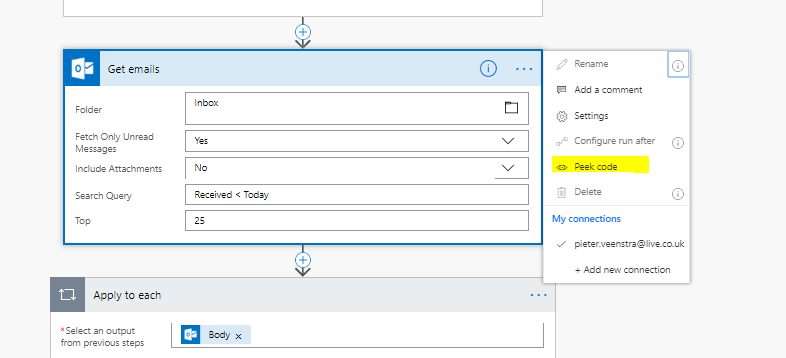
When you click on the peek code option for an action or a trigger, you will find the json that was used to behind the pretty interface of Microsoft Flow.

This is a great step forward toward debugging all those unclear messages. It will also help a lot of user understand why things go wrong some times.
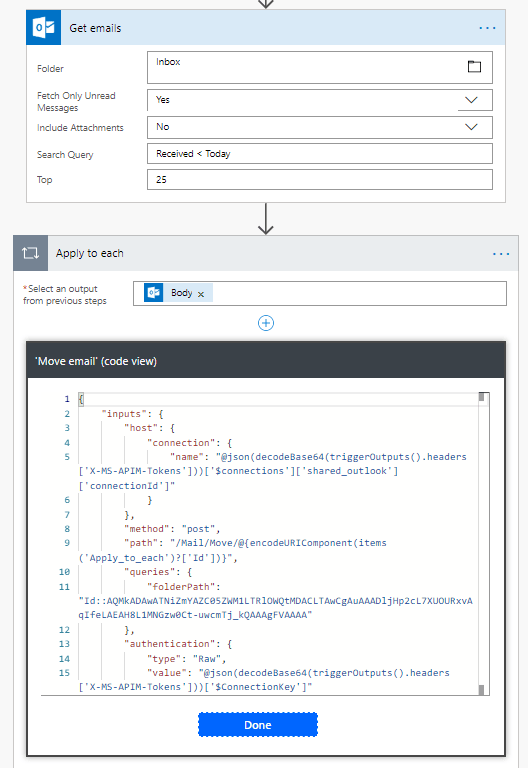
Imagine if you created flow that moved an email from one location to another

You can now see what happens internally and you will find that items(‘Apply_to_each’)?[‘Id’] is used to select the email.
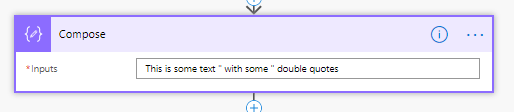
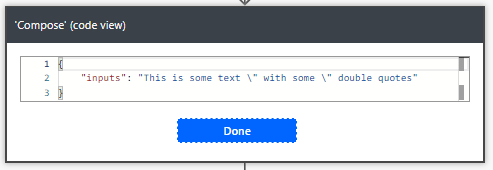
Now imagine if you wanted some double quotes in a text. As you can see in the above example Double quotes in json could cause trouble. I’m going to set a compose action to some text with double quotes.
I can now see that the double quotes are handles correctly as they have been escaped with double quotes
PowerApps Trigger
Taking this all a step further, you can now also see all the input in triggers. You will find that within buttons, PowerAppstriggers that you can now get a lot more detail on the parameters that you created.
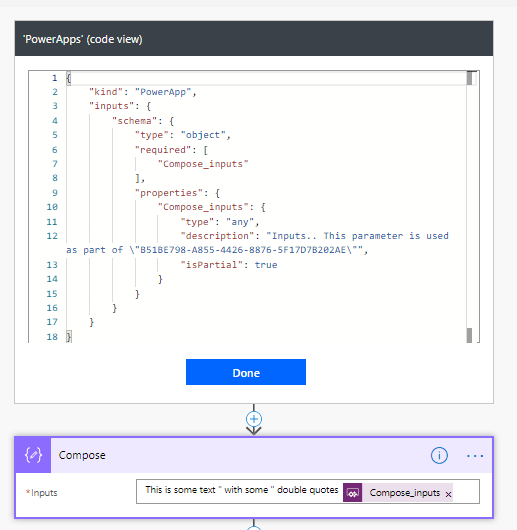
In the above example I created an input and within the peek code you can see that this is of the type any. These pieces of information used to be hidden form the user unless you exported the flows and looked at the json file that was exported. Event better I can even see that it is used within the Compose action.
My Thoughts
Often I hear people say that LogicApps is better than Flow as it is possible to see the code created within the graphical interface. Personally I’ve not needed to see any code of my flows, even though sometimes it would have been helpful.
Now we have yet another reason why Flow should be seen as the tool to be used rather than LogicApps as the tool to develop your automated processes.
Pieter Veenstra

Is your business still running on paper trails, sprawling Excel files, or ageing Access databases? There's a better way — and I can show you exactly what it looks like. I'm the Technical Director of Vantage 365, a Microsoft solutions consultancy working with clients across the UK, the Netherlands, and worldwide. For over 30 years I've been turning messy, manual business processes into clean, automated systems that save time, reduce errors, and give teams the visibility they need to make better decisions. SharePains is not just any blog run by a Microsoft MVP. Have you ever used Try-Catch in Power Automate? The original post about Try-Catch in Power Automate can still be found on this site, https://sharepains.com/2018/02/07/try-catch-finally-in-power-automate-flow/ Or have you ever used the Pieter’s method to avoid variables and speed up your flows? https://sharepains.com/2020/03/11/pieters-method-for-advanced-in-flows/ You can contact me using contact@sharepains.com


I noticed the Peek Code in the PowerApps trigger the other day. It’s really helpful to work out the parameters that add up when you inadvertently click on “Ask in PowerApps” before giving the variable a proper name. I just wish it was possible to edit the code, too, in order to delete the rogue parameters that I inadvertently created, so I don’t have to enter “dummy” parameters in my PowerApps run command.
Did you see my post from about a week ago where I passed just just parameter to flow as json text? That way the parameters never change.
https://veenstra.me.uk/2019/01/29/powerapps-send-your-data-to-microsoft-flow-with-less-parameters/