

One of the outstanding issues with the new Power Automate Designer is Copy and Paste for Scope steps and other steps that can contain multiple actions.
Copy and Paste in the new Power Automate designer
Even though Copy and Paste has been around in the classic editor forever as a preview feature. It does help a lot to speed up development of flows.
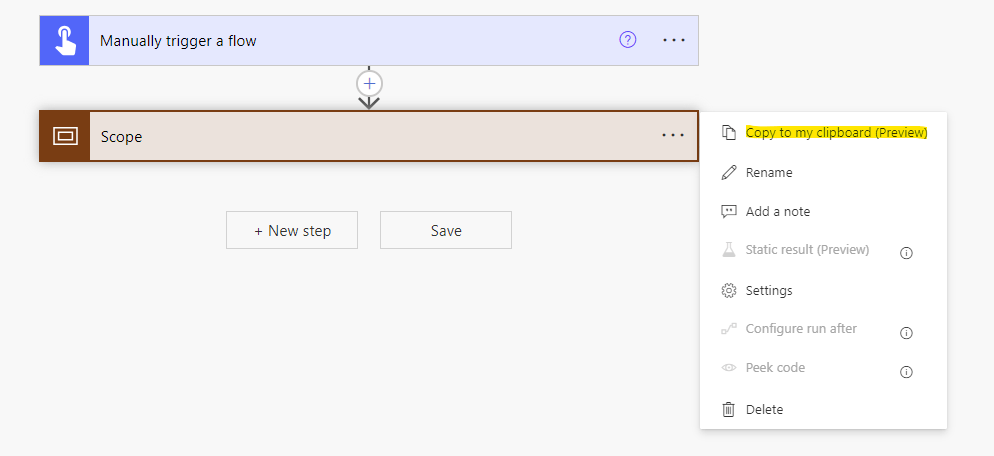
When we look around in the new designer there is now an option to copy Scope actions.

This copy paste for scopes will copy the scope action and all the steps inside the scope action. Where in the past we had to use Copilot to do this for us. The copy paste action is now available directly on the scope action.
Copy the scope step using Copilot

And now we have a flow with a copy of the Scope step with all its steps included. This is a great way to use Copilot to do something that isn’t fully there in the new UI yet.
Copy/Paste Expectations
I often get asked about what you can copy within a flow. I would compare copying parts of a flow with copying code. Power Automate attempts to rename and fix things for you. This is almost expected. Is there any programmer who would expect that when they copy their code that the programming tools would fix the code for them?
I wouldn’t expect so.
So why do we expect the low code tools to fix everything for us?
One of the limitations of Copy/Paste in Power Automate has always been that you can’t copy actions from one switch branch to another. Why not? I would be happy for the action to be copied even if that leaves my flow broken. Fix it and then, test it. But the problem of course is that it would risk a flow becoming unusable. This is why you should always have a development environment where you are happy for flows to break. Then once all is working again deploy the solution to Test/UAT and Production.
Pieter Veenstra

Is your business still running on paper trails, sprawling Excel files, or ageing Access databases? There's a better way — and I can show you exactly what it looks like. I'm the Technical Director of Vantage 365, a Microsoft solutions consultancy working with clients across the UK, the Netherlands, and worldwide. For over 30 years I've been turning messy, manual business processes into clean, automated systems that save time, reduce errors, and give teams the visibility they need to make better decisions. SharePains is not just any blog run by a Microsoft MVP. Have you ever used Try-Catch in Power Automate? The original post about Try-Catch in Power Automate can still be found on this site, https://sharepains.com/2018/02/07/try-catch-finally-in-power-automate-flow/ Or have you ever used the Pieter’s method to avoid variables and speed up your flows? https://sharepains.com/2020/03/11/pieters-method-for-advanced-in-flows/ You can contact me using contact@sharepains.com

Copy/Paste is very unreliable when there are expressions being used. They are often lost in the process. Also, condition actions do not report an issue after copy when they include expressions so your flow appears to run but does not. Finally, renaming is nearly impossible without having to find expression issues . So there are a lot of platform issues that Microsoft needs to correct before copy/paste is painless to use.