
As I’m catching up after a few days having been offline, I noticed the Request sign-off now available in SharePoint Online

The read more link on the message got me to a Tech community discussion
Being able to start an approval process on the document libraries is of course a common requirement.
But, do we really need Microsoft to develop our Flows? I could imagine many clients not wanting to have this flow on every document library. There seems to be a discussion where a lot of people are asking how to disable this Flow.
Disable Request Sign-off flow

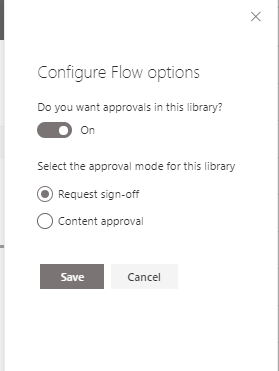
Recently Microsoft added the configure flow option. This option makes it possible to switch back to the Content approval or even disable approval all together.
Ok, it is a bit annoying that you have to do this on each library but at least the option now exists.
Pieter Veenstra

Is your business still running on paper trails, sprawling Excel files, or ageing Access databases? There's a better way — and I can show you exactly what it looks like. I'm the Technical Director of Vantage 365, a Microsoft solutions consultancy working with clients across the UK, the Netherlands, and worldwide. For over 30 years I've been turning messy, manual business processes into clean, automated systems that save time, reduce errors, and give teams the visibility they need to make better decisions. SharePains is not just any blog run by a Microsoft MVP. Have you ever used Try-Catch in Power Automate? The original post about Try-Catch in Power Automate can still be found on this site, https://sharepains.com/2018/02/07/try-catch-finally-in-power-automate-flow/ Or have you ever used the Pieter’s method to avoid variables and speed up your flows? https://sharepains.com/2020/03/11/pieters-method-for-advanced-in-flows/ You can contact me using contact@sharepains.com


I’d like to know how to pin team flows to a library toolbar as shown. Google hasn’t revealed this mystery to me yet…
You can use the for a selected item trigger in the SharePoint connector for this.
Anyone managed to figure out how to disable these Approval flows or take them off the list of flows?! Wondering whether to delete the site and start again … too unprofessional to have them there after just testing them out in practice. Grrrrr
Hi Wendy,
I don’t think that the option exists to disable the Request Sign off. I would expect this to arrive soon though.
When I tried to use the “Request Sign-off”, the Run flow button is greyed out. Any idea why and how to fix?
Hi Mark,
I have not seen that before. Can you send me a screenshot?
Microsoft recently introduced a way to configure these native workflows. Now there is an option to disable this workflow.
You can either replace it with the “Content Approval” flow or disable it entirely.
For steps on how to disable this feature:
https://www.technologytobusiness.com/microsoft-sharepoint/delete-request-sign-off-workflow
Thanks. I’ve updated my post.